Customizable Email Notifications for Every Tenant
Emails are an important part of daily business communication.
Companies regularly send account verification messages, order confirmations, shipping updates, project notifications, task assignments, team invitations, and many other operational emails.
Creating every email manually takes time. Using the same generic design for every business also makes communication feel disconnected from the company’s brand.
TenantSaaS solves this problem by providing predefined, customizable email templates for every tenant.
When a new tenant or company workspace is created, it can start with ready-to-use notification templates. These templates can then be updated to match the company’s branding, communication style, and business requirements.
Reduce Repetitive Email Work
Our goal at TenantSaaS is to reduce the amount of time users spend on repetitive daily tasks.
Instead of writing the same notification every time an order is confirmed, a task is assigned, or a team member is invited, businesses can prepare reusable templates.
Once a template is configured, TenantSaaS can use it whenever the related business event occurs.
This helps teams maintain consistent communication while reducing unnecessary manual work.
Start With Predefined Email Templates
Every tenant should not have to build its complete email system from the beginning.
TenantSaaS provides predefined templates for common business events, including:
Email address verification
Order payment confirmation
Order shipment
Order cancellation
Project creation
Project updates
Task assignments
Task updates
Team invitations
These templates provide a reliable starting point. Tenants can use them immediately or customize them according to their own needs.
This approach makes the initial company setup faster while still giving every business control over its communication.
Customize Emails for Your Business
Every company has its own branding, tone, and communication requirements.
A retail company may want colorful order emails, while a professional services company may prefer a clean and minimal design. A growing SaaS business may also need different templates for projects, teams, subscriptions, and customer communication.
TenantSaaS allows tenants to customize important parts of their email notifications, including:
Email Content
Update the main message according to the purpose of the notification.
Businesses can write more formal, friendly, concise, or detailed content based on how they communicate with customers and team members.
Subject Lines
The subject line is one of the first things a recipient sees.
Tenants can create clear and relevant subjects for different notifications, such as:
Your order has been confirmed
A new task has been assigned to you
You have been invited to join a team
Your project information has been updated
Sender Information
Tenants can configure the sender name and sender email address used in their templates.
This helps recipients immediately understand which company or workspace sent the notification.
Preheader Text
The preheader is the short text that may appear beside or below the email subject in supported email clients.
It can provide additional context before the recipient opens the message.
Titles and Headings
Each email can have a clear title that communicates the purpose of the notification.
For example:
Order Payment Confirmed
New Project Created
Task Updated
Team Invitation
Colors and Backgrounds
Tenants can customize visual elements so their emails better match their company branding.
This may include header colors, background styles, content sections, buttons, and footer areas.
Icons and Visual Identity
Relevant icons can help recipients quickly recognize the type of notification they have received.
A payment email may use a payment icon, while a project or task notification may use an icon related to collaboration or productivity.
Create Reusable Email Themes
TenantSaaS separates email content from reusable design themes.
This means a business can create a branded theme and use it across multiple email templates without rebuilding the complete design every time.
A theme can help maintain consistency across:
Company logos
Header styles
Brand colors
Typography
Content spacing
Footer information
Support details
For example, a tenant may use one theme for order-related emails and another for project or team notifications.
Existing themes can also be edited or duplicated, making it easier to create variations for different departments or business modules.
Personalize Emails With Dynamic Information
Generic notifications are less useful when recipients cannot see the details related to their activity.
TenantSaaS templates can use supported dynamic placeholders to insert relevant information into an email when it is generated.
Depending on the notification, this may include:
Customer name
Order number
Order status
Payment method
Total amount
Order date
Ordered items
Project information
Task information
Team or workspace details
For example, an order confirmation template can automatically include the correct customer name, order number, payment status, and total amount.
This allows one reusable template to generate personalized emails for many different recipients.
Preview Emails Before Using Them
Small mistakes in an email template can create confusion for customers or team members.
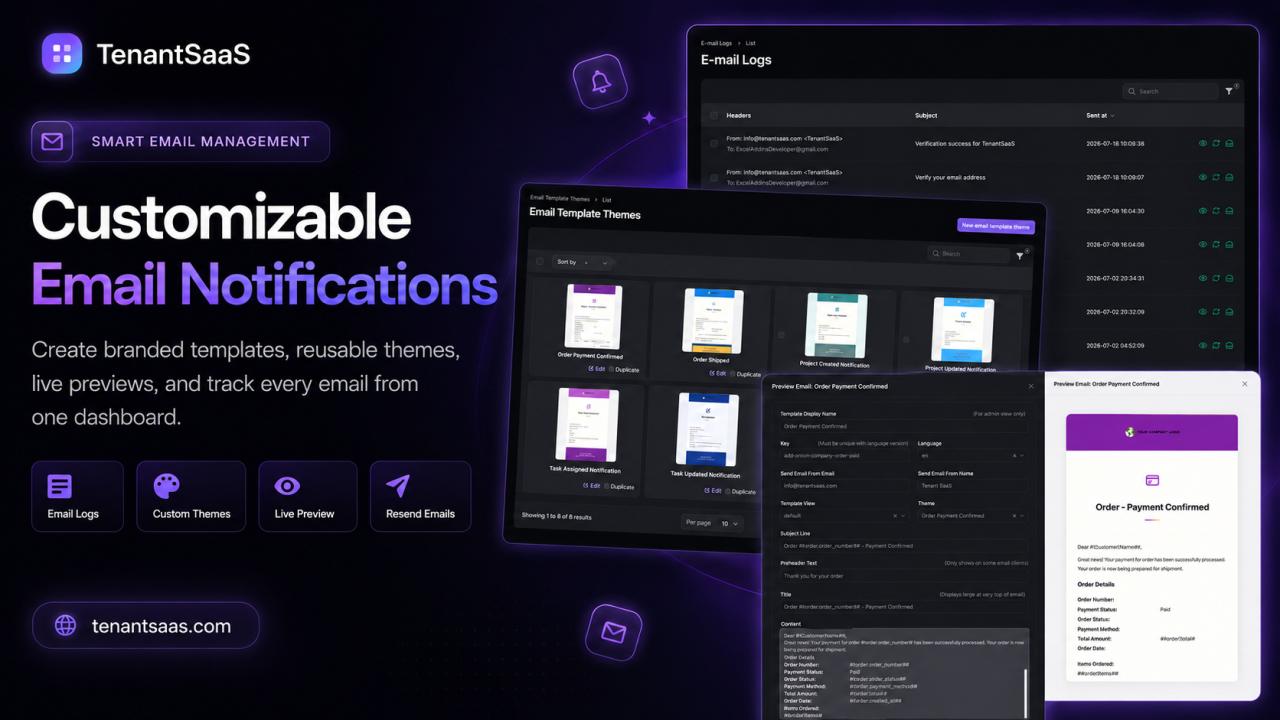
TenantSaaS provides an email preview so tenants can review how a notification will appear before using it.
The preview makes it easier to check:
Email layout
Main content
Subject and title
Branding
Theme colors
Dynamic placeholders
Order or project details
Header and footer presentation
This helps businesses identify content or design issues before the email becomes part of their regular workflow.
Manage Email Logs From One Dashboard
Sending emails is only one part of communication management.
Businesses also need visibility into what has already been sent.
TenantSaaS provides a centralized email log where authorized users can review previous notifications.
The email log can display information such as:
Sender details
Recipient email address
Email subject
Date and time sent
Available email actions
Users can search and review email records without moving between multiple systems.
This is especially useful when a customer reports that they did not notice an email or when a team needs to confirm that a notification was generated.
Review and Resend Previous Emails
Sometimes an important email needs to be sent again.
Instead of manually rebuilding the message, authorized users can access the existing email record and use the available resend action.
This can help with situations such as:
A customer missed an order confirmation
A team member could not find an invitation
A project notification needs to be delivered again
A verification email was overlooked
The recipient requested another copy
Keeping these actions inside the same dashboard makes email management faster and more organized.
Built for Multi-Tenant Businesses
TenantSaaS is designed as a multi-tenant business platform.
Each tenant represents its own company or workspace, with its own users, business processes, settings, and communication requirements.
Email customization allows every tenant to build a communication style that matches its own identity instead of using one fixed design for the complete platform.
This makes the feature useful across different TenantSaaS modules, including:
Customer relationship management
Product and order management
Project management
Task management
Team collaboration
Human resource management
Marketing
SaaS workspace administration
The result is a more flexible notification system that can support different types of businesses from one platform.
The Benefits of Customizable Email Notifications
Customizable email notifications help businesses create a more professional experience while saving time.
With TenantSaaS, tenants can:
Begin with predefined templates
Customize content according to business requirements
Apply their own branding and visual styles
Use reusable email themes
Personalize messages with dynamic information
Preview emails before using them
Review previous notifications
Resend important messages
Manage communication from one dashboard
Instead of treating emails as a separate manual task, businesses can make them part of their regular automated workflows.
Professional Communication Without Rebuilding Every Email
Business emails should be clear, consistent, and aligned with the company’s identity.
TenantSaaS provides the tools tenants need to prepare professional notifications without creating every message from scratch.
Start with predefined templates, customize them according to your brand, preview the final result, and manage previous emails from one centralized workspace.
Create better business communication with less repetitive work.
Visit tenantsaas.com to explore customizable email notifications and other business management features.
Suggested CTA
Turn Every Email Into a Branded Business Experience
Create reusable templates, customize your email designs, preview notifications, and manage email history directly from your TenantSaaS workspace.
Start exploring TenantSaaS today.
Suggested Featured Image Alt Text
TenantSaaS customizable email notifications showing email templates, reusable themes, live preview, email logs, and resend actions
Suggested Tags
TenantSaaS, Email Automation, Email Templates, Custom Email Notifications, SaaS Automation, Multi-Tenant SaaS, Business Communication, Laravel SaaS, Email Management