Built for small teams and HR staff
Founders, office managers, and HR teams that need clean employee records without running enterprise HR software.
HRM feature
TenantSaaS HRM keeps employee records, departments, designations, daily attendance, and leave requests organized in one tenant-aware module with a self-service dashboard for every employee and an HR Analytics dashboard for the people managing them.
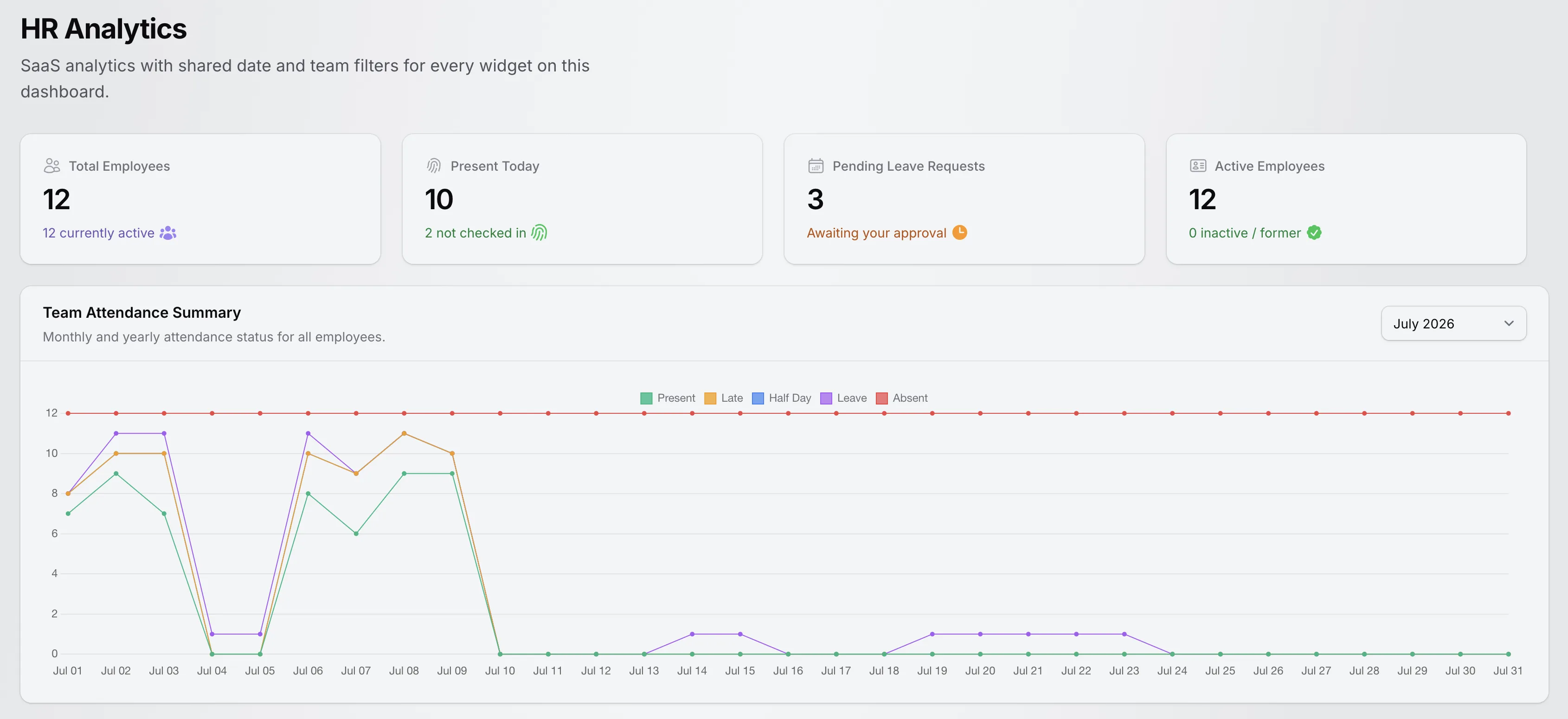
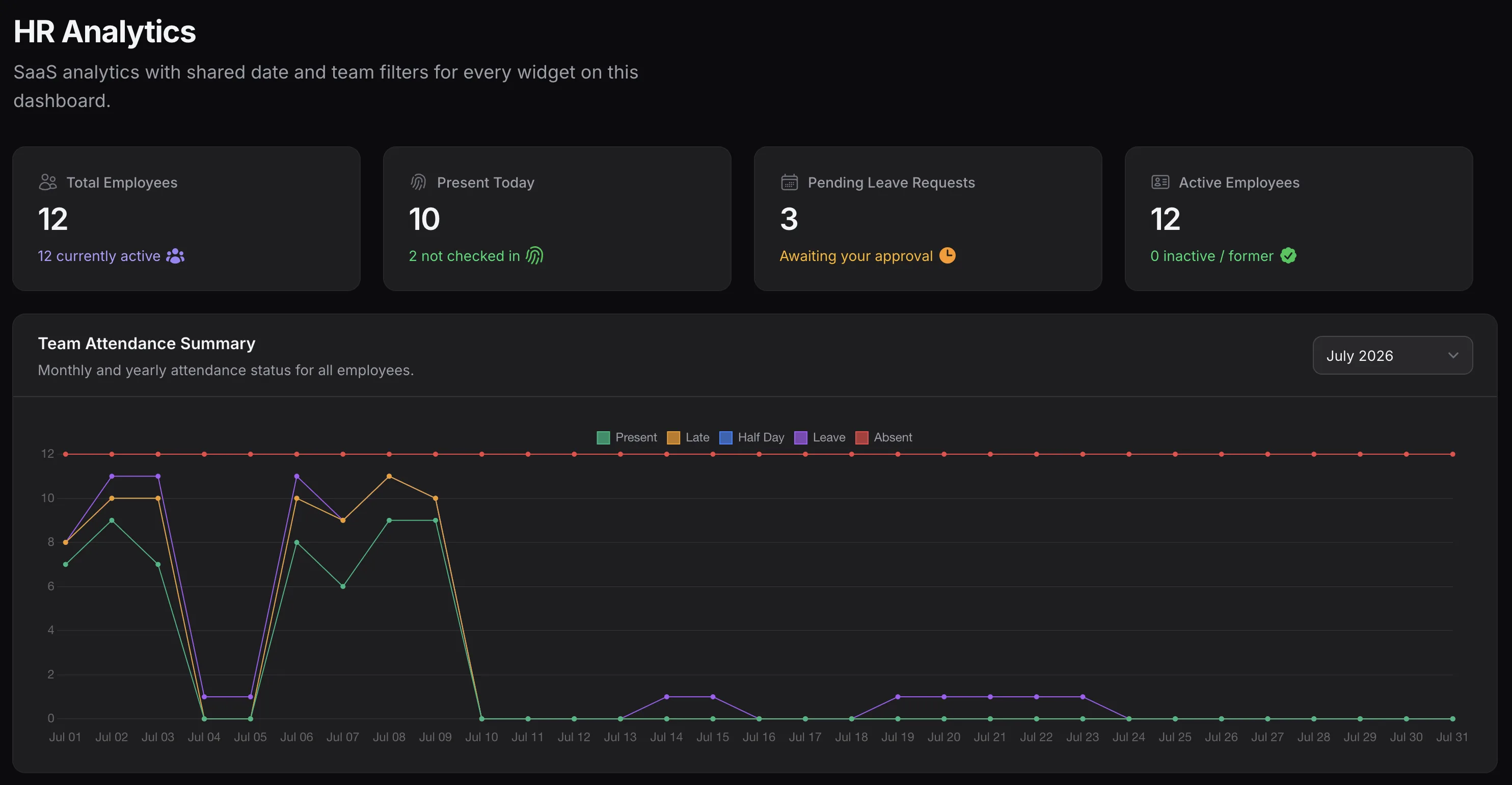
The implemented HR Analytics dashboard with workforce stats and the team attendance summary. Shown with demonstration data.
HRM Overview
TenantSaaS HRM lives inside the workspace panel alongside the rest of TenantSaaS. It replaces the employee spreadsheet, the attendance register, and the leave-request email thread with structured records that stay connected to each other.
Founders, office managers, and HR teams that need clean employee records without running enterprise HR software.
Attendance, leave requests, departments, designations, and managers all hang off the same employee record.
Employees see their own dashboard; HR and managers see the lists, approvals, and analytics behind the whole team.
Every HR record belongs to the active workspace and follows its permission system — one tenant never sees another's data.
The HRM Workflow
Every step below maps to functionality implemented in TenantSaaS HRM today — no aspirational features.
Add each employee with a generated employee ID, contact details, hire date, employment type, and status.
Organize employees into departments, assign designations, and set each employee's reporting manager.
Link an employee to a workspace user account so they can sign in and use their personal dashboard.
Employees punch in and punch out from their dashboard; authorized users can also manage attendance records directly.
Employees request leave with a leave type, date range, automatically counted weekdays, and a reason.
A permitted reviewer approves or rejects each pending request, and the approver and time are recorded.
Approved and pending leave appears on a team timeline, so upcoming availability is visible in advance.
Headcount, daily presence, pending requests, attendance trends, and workforce distribution stay on one dashboard.
Core HRM Features
Each card below reflects a resource or dashboard implemented in TenantSaaS — jump to its section for the details.
Structured employee records with generated IDs, contact details, employment data, and a clear status.
Define the organizational units and job titles that keep the workforce organized and filterable.
Daily attendance records with punch-in and punch-out times and clear day statuses.
A complete request-and-review workflow from submission to approval or rejection.
Configurable leave categories that shape how requests are submitted and displayed.
A personal dashboard where each employee manages their own attendance and leave.
A management dashboard summarizing the workforce for the active workspace.
A team timeline of upcoming approved and pending leave across a chosen date range.
Employee Management
The Employees list is the foundation of the module: every attendance record, leave request, and analytics number traces back to an employee record here.
First and last name, email, phone, date of birth, address, hire date, employment type, and an optional salary amount on one record.
Every employee receives a generated identifier with an EMP prefix, so records stay referenceable across the workspace.
Assign each employee a manager and see direct reports through the manager relationship on the record.
Track employees as active, inactive, on leave, or terminated, with bulk actions to mark records active or inactive.
Link or unlink a workspace user account per employee — the table shows exactly who can sign in and who exists only in HR records.
Search by ID, name, or email; filter by status, employment type, and department; and restore soft-deleted records when needed.
Departments & Designations
Departments and designations are the two organizational building blocks every employee record attaches to and every distribution chart is built from.
Each workspace defines its own departments with a name and description, and sees how many employees belong to each.
Job titles carry a description and an optional salary range, giving consistent role definitions across the team.
Department and designation assignments drive employee filters, the headcount chart, and the planned-absences filters.
These are the actual lifecycle statuses and employment types an employee record can hold:
Attendance Management
Attendance is built from simple daily records — a date, a status, and punch times — that roll up into the summaries employees and managers see.
Employees record their own check-in and check-out times from the dashboard; punching in marks the day present.
Authorized users create and edit attendance records directly, including a status and optional notes per day.
Every attendance record is present, late, half-day, or absent — each with its own color across the module.
The attendance list filters by status and employee, with one-click today, this-week, and this-month views.
Attendance rate compares attended days against expected weekdays for the period, starting from the hire date.
Approved leave that overlaps the period is counted as leave days in the dashboard summaries — separate from absence.
Attendance is recorded through the dashboard and the attendance list — TenantSaaS HRM does not claim biometric devices, GPS tracking, or facial recognition.
Employee Self-Service
Employees with portal access get their own dashboard attendance, leave, and personal task information without asking HR. The screenshots show demonstration data.
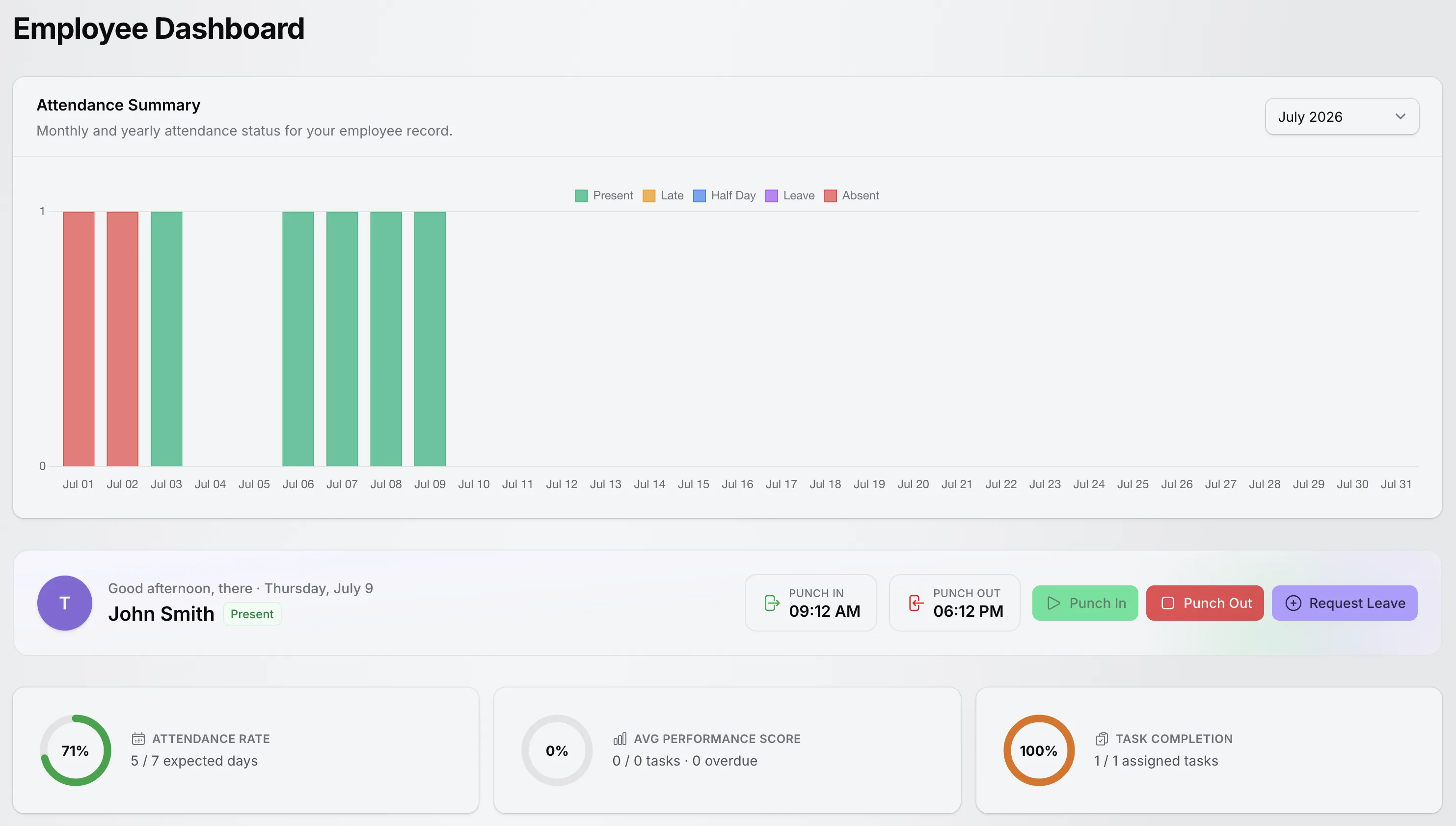
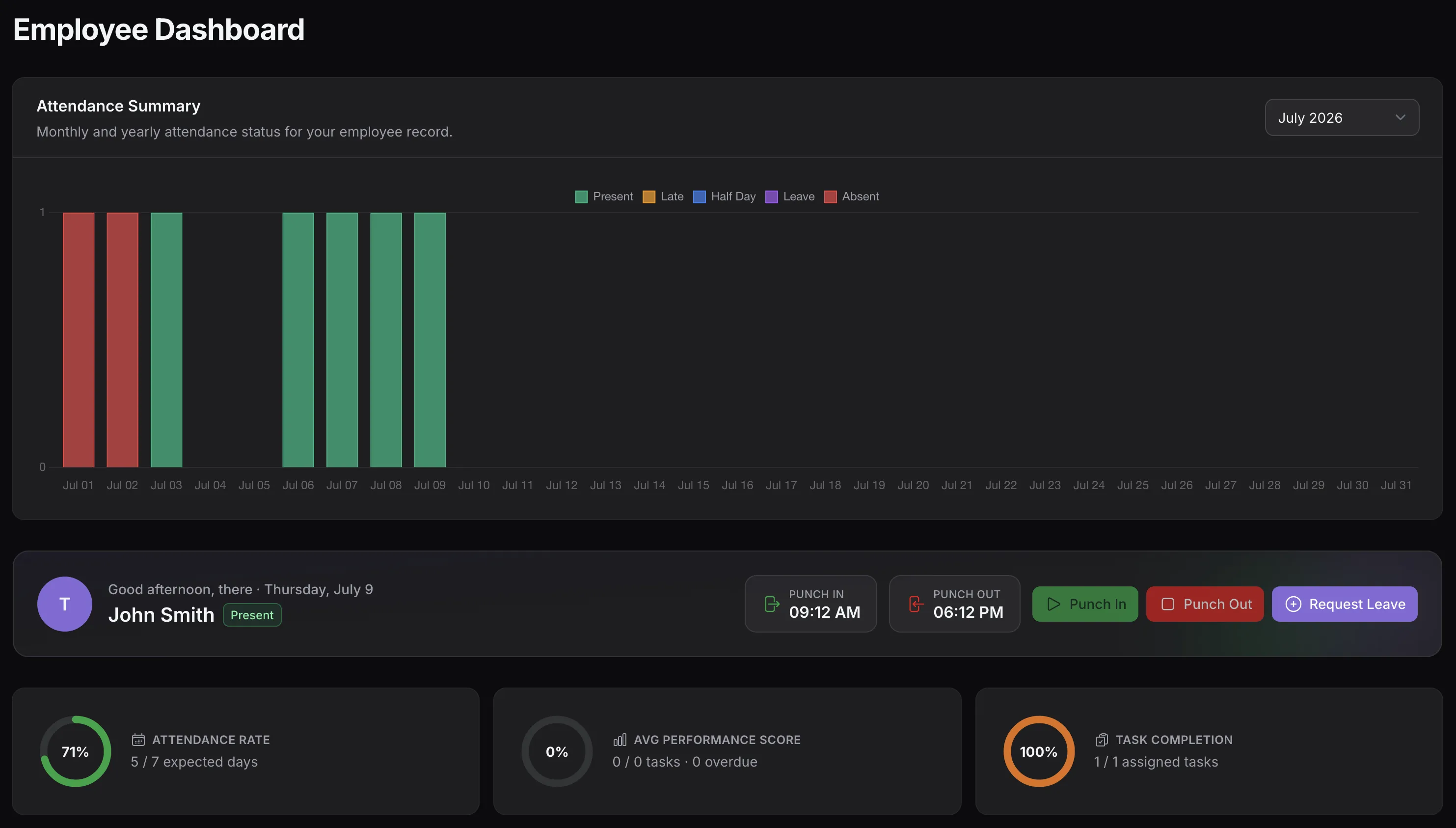
Monthly attendance chart, current status with punch-in and punch-out times, request-leave action, attendance rate, performance score, and task completion.
One tap records the check-in time and marks the day present; punching out records the check-out time — with clear notices if a step is repeated or skipped.
A greeting with today's date, the current attendance status, and the recorded punch-in and punch-out times.
A request-leave form with leave type, start and end dates, an automatically counted number of weekdays, and an optional reason.
A per-day chart of present, late, half-day, leave, and absent days, switchable by month or full year back to the hire date.
Attended days measured against expected weekdays for the selected period, shown as a percentage with progress indicators.
Totals for assigned, pending, overdue, and completed workspace tasks, plus a task-based performance score for the period.
For any selected month or year, the dashboard calculates the employee's attendance rate against expected weekdays and breaks the period into present, late, half-day, leave, and absent counts each with its share of expected days. A tasks summary sits beside it with total, pending, overdue, and completed assigned tasks.
The values shown are calculated per employee and per period the screenshot's numbers are demonstration data, not platform statistics.
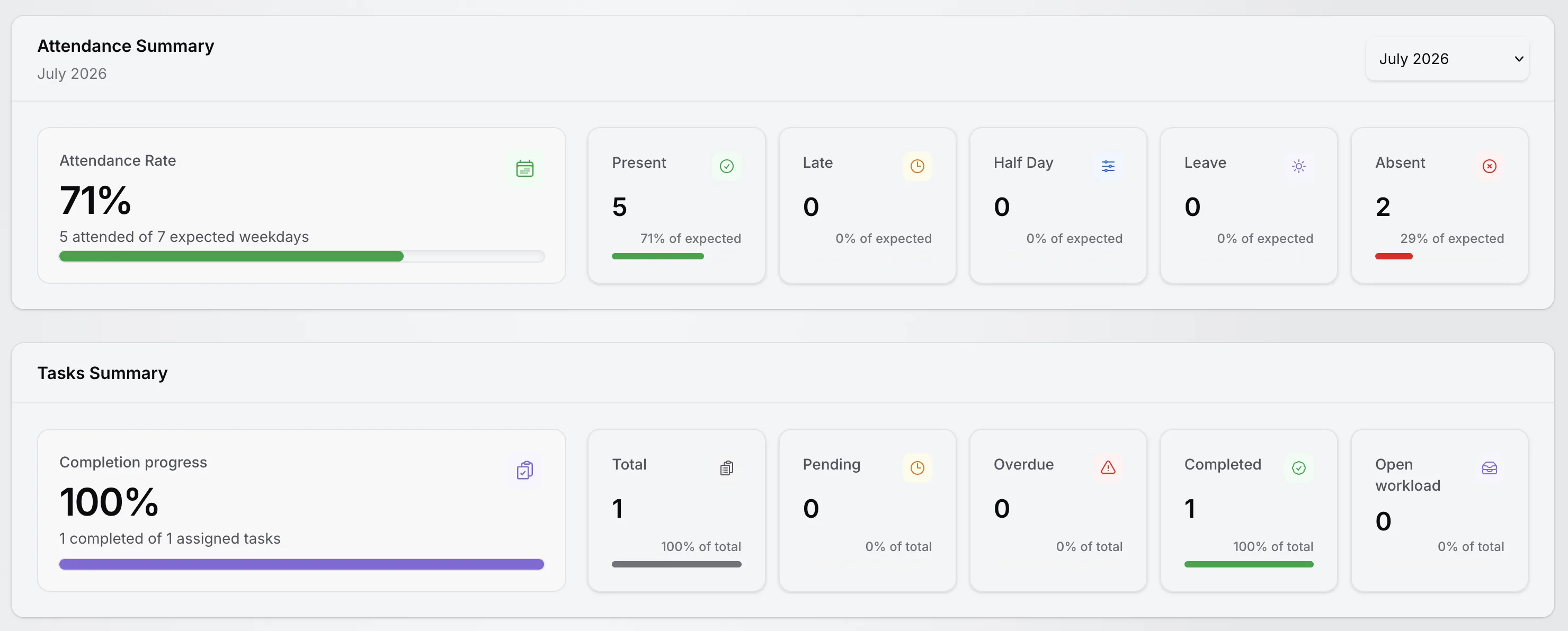
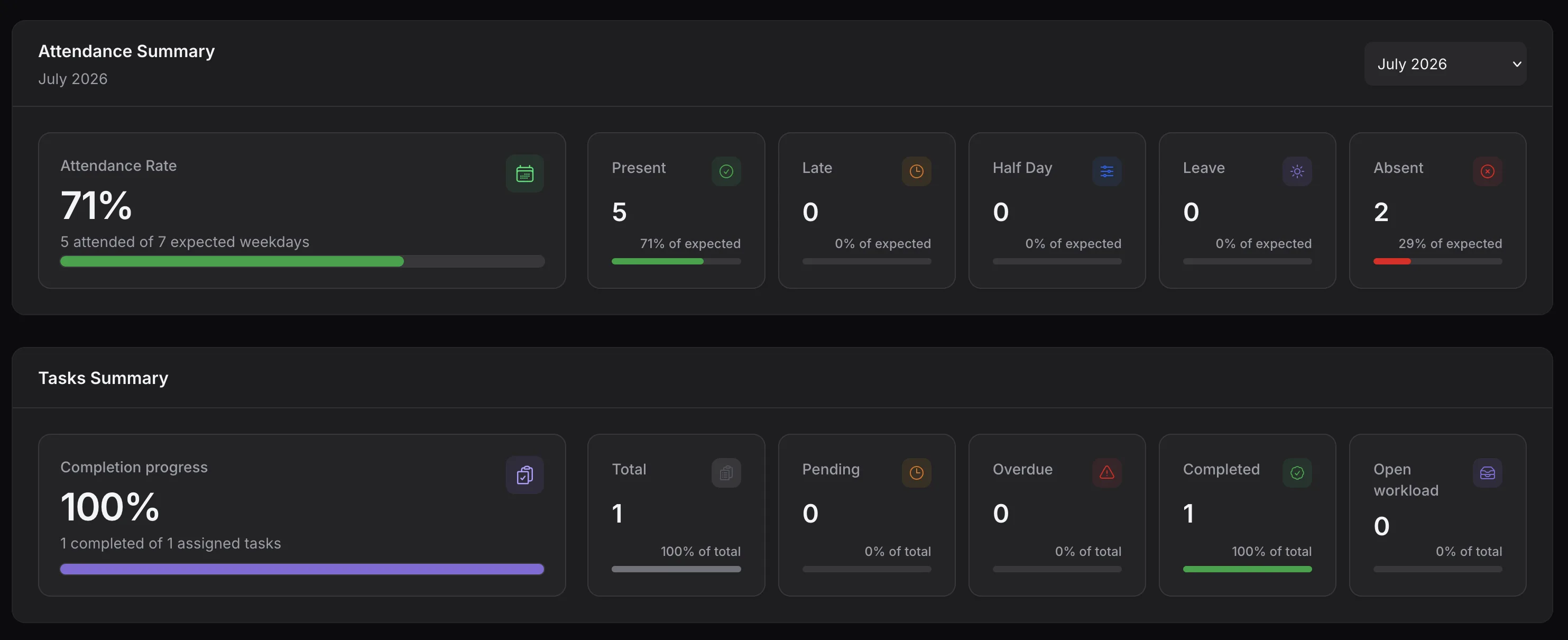
Attendance rate against expected weekdays with per-status counts, beside the assigned-tasks summary.
Leave Management
Leave management combines configurable leave types with a request workflow that always records who decided and when.
From the dashboard's request-leave form or the leave-request list, with type, dates, and reason.
New requests start pending and appear in the pending count on HR Analytics.
Users with the approve permission approve or reject — from the list or the planned-absences timeline.
Approved leave feeds the planned-absences timeline and the leave counts in attendance summaries.
HRM does not claim automatic leave accrual, country-specific leave laws, payroll deductions, or calendar synchronization — leave stays a clear request-and-review workflow.
HR Analytics
HR Analytics is the management view of the module: headline stats, the team attendance chart, and workforce distribution widgets. The screenshot shows demonstration data.
Total employees, present today, pending leave requests, and active employees above the team attendance summary chart.
Workforce headcount with the currently active count, and a separate card tracking inactive or former employees.
How many employees have checked in today, alongside how many have not checked in yet.
The number of requests awaiting approval, one click away from the leave-request list.
A per-day chart of present, late, half-day, leave, and absent counts for the whole team, switchable by month or year.
Each stat card links directly to the employees, attendance, or leave-request list behind the number.
Every number is calculated from the active workspace's own employees, attendance, and leave requests.
Workforce Distribution & Planned Absences
The second half of HR Analytics turns employee records and leave requests into distribution charts and a forward-looking absence timeline.
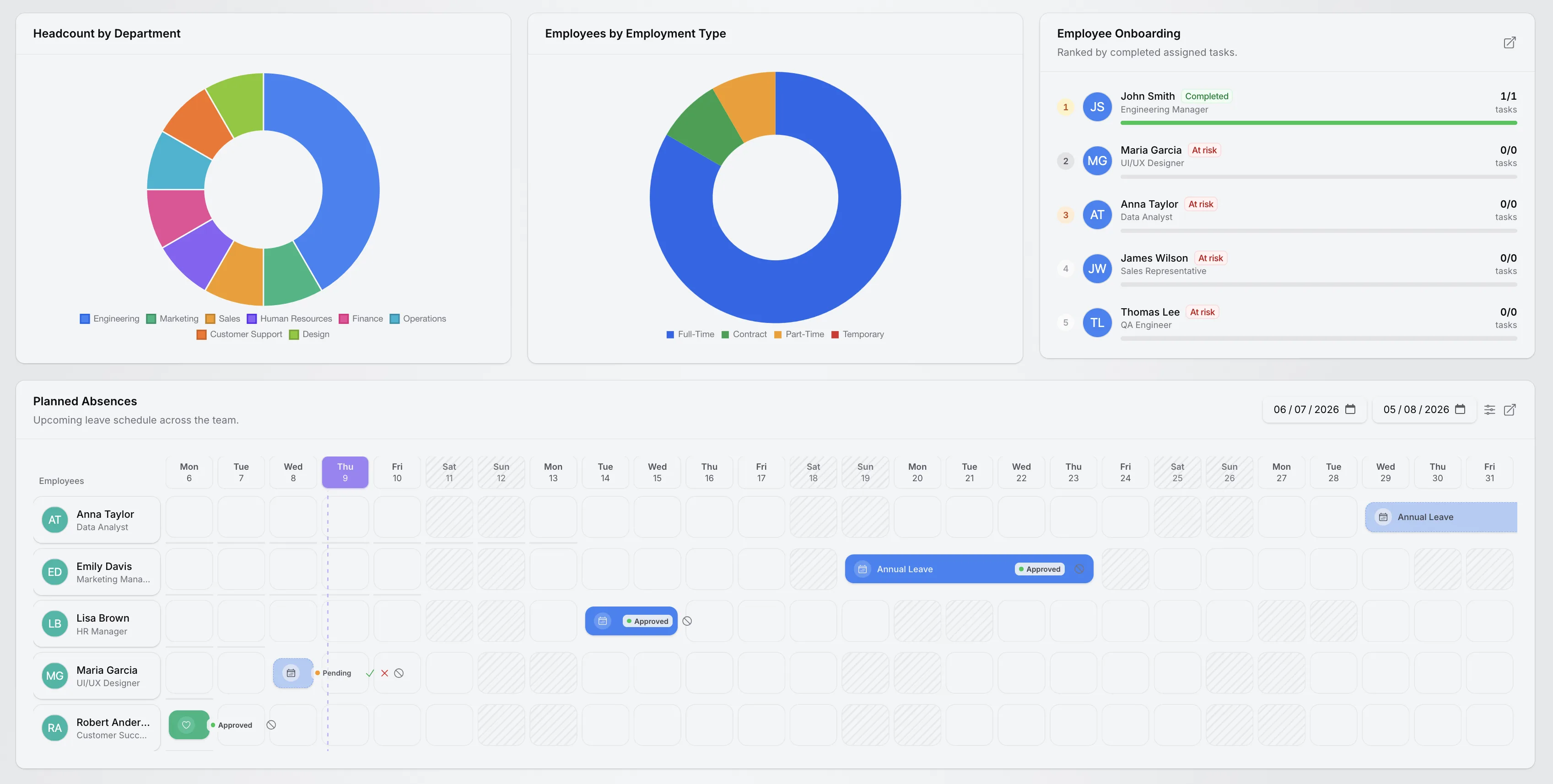
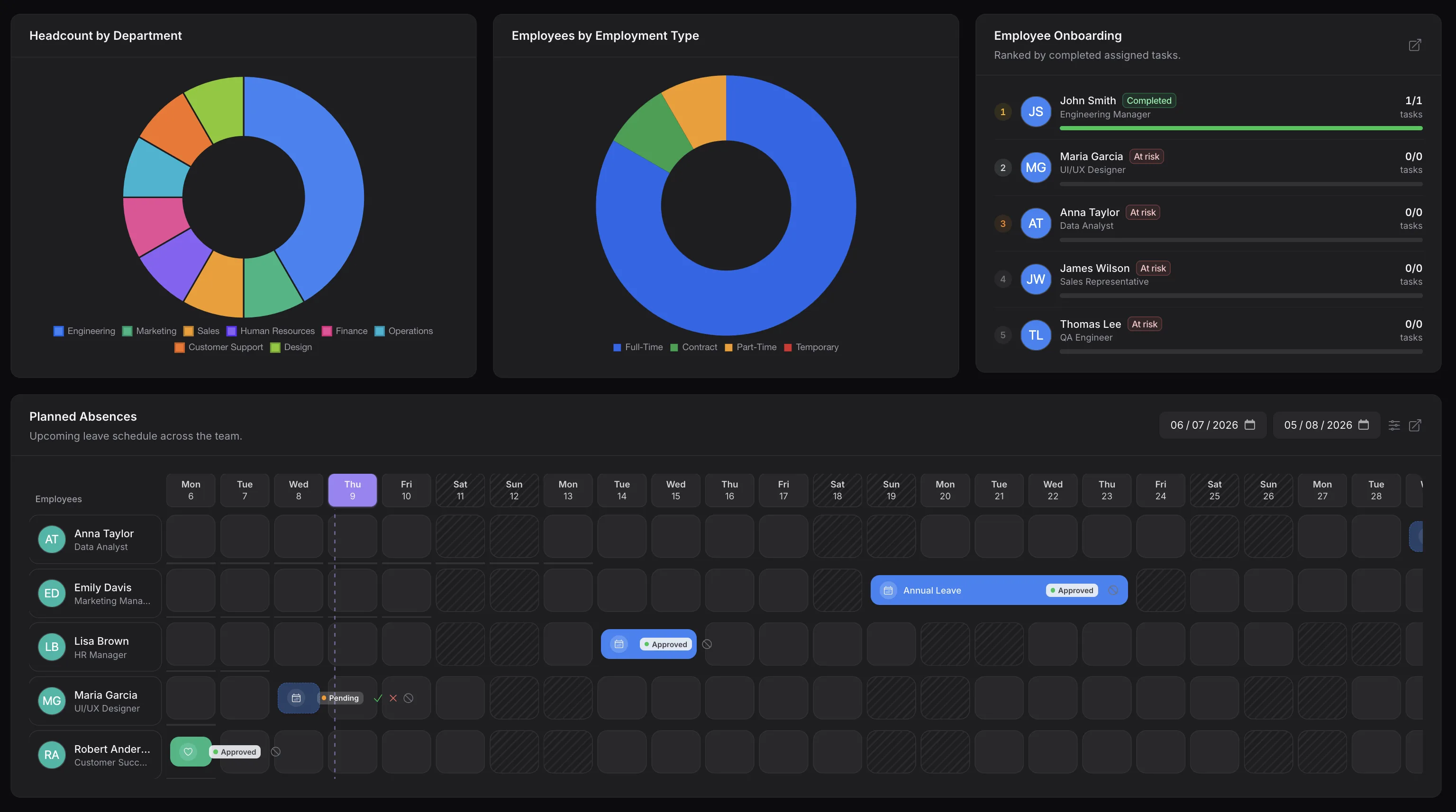
Headcount by department, employees by employment type, the onboarding ranking, and the planned-absences timeline with date filters.
A chart of how employees are distributed across the workspace's departments.
The split between full-time, part-time, contract, and temporary employees.
Active employees ranked by completed assigned tasks, with completion progress and at-risk highlighting for employees without completed work.
A day-by-day team timeline of approved and pending leave, with weekends marked and today highlighted.
Planned absences is a leave-visibility timeline, not a shift scheduler — and the onboarding widget is a task-completion ranking, not an onboarding automation system.
Access, Accounts, and Tenancy
HRM follows the same permission system and workspace boundaries as the rest of TenantSaaS.
Workspace owners decide who may view, create, update, or delete employees, departments, designations, attendance, and leave records through the existing permission system.
Approving and rejecting leave requests are separate permissions, so leave decisions stay with the people you choose.
An employee can be linked to one workspace user account validated against workspace membership and the employee role is assigned automatically on linking.
Employees, departments, designations, attendance, leave types, and leave requests belong to the workspace that created them, and every query is scoped to the active workspace.
Employees with portal access see their own dashboard, while the management lists, approvals, and HR Analytics remain behind the workspace's permissions. General user management is its own TenantSaaS capability — HRM only links to it.
Practical Use Cases
Each of these flows uses only functionality implemented in the module today.
Create departments and designations, add employees with generated IDs, and assign each one a manager so the reporting structure stays clear.
Employees punch in and out from their dashboard while HR reviews the attendance list with today, this-week, and this-month filters.
Define leave types with yearly allowances, receive requests with counted weekdays, and approve or reject them with a recorded reviewer.
Check present-today counts on HR Analytics and scan the planned-absences timeline before committing the team to new work.
Linked employees see their own attendance history, rate, and task summary — without asking HR for routine information.
Understand headcount by department and the employment-type mix from the distribution charts on HR Analytics.
Benefits
Practical gains grounded in what the module actually does — no invented percentages.
Profiles, departments, designations, managers, and portal access live together instead of in scattered spreadsheets.
Punch-in and punch-out records build the attendance history on their own, and summaries are calculated for you.
Every request records its reviewer, action time, and rejection reason, and status changes are kept in an activity log.
Attendance history, leave requests, and task summaries are available to each employee on their own dashboard.
Planned absences show upcoming approved and pending leave across the team before it becomes a surprise.
Every employee, attendance record, and leave request belongs to one workspace and follows its permissions.
One Workspace
TenantSaaS HRM does not eliminate every external HR process, but it puts the employee-to-analytics workflow in one place.
Every record stays in your workspace, visible to the people you permit.
Documentation
No dedicated public HRM documentation route exists yet, so this page links only to existing public developer and open-source pages.
FAQ
Answers are based on the HRM implementation that exists in this codebase.
TenantSaaS HRM is a workspace module for managing employees, departments, designations, attendance, and leave requests, with an employee self-service dashboard and an HR Analytics dashboard for managers. All HR data is scoped to the active workspace.
Each employee record stores a generated employee ID, first and last name, email, phone, date of birth, address details, hire date, employment type, status, an optional salary amount, plus department, designation, and manager assignments.
Yes. Employees with portal access punch in and punch out from their dashboard. Punching in records the check-in time and marks the day present; punching out records the check-out time. The dashboard prevents double punch-ins and punching out before punching in.
Attendance records use present, late, half-day, and absent statuses. Leave days shown in dashboard summaries are calculated separately from approved leave requests that overlap the selected period.
Yes. The employee dashboard has a request-leave form with a leave type, start and end dates, an automatically counted number of weekdays, and an optional reason. New requests start in pending status.
Yes. Users with the approve permission can approve or reject pending requests from the leave-request list or directly on the planned-absences timeline. The reviewer, action time, and any rejection reason are recorded, and status changes are kept in an activity log.
Yes. Each workspace defines its own leave types with a name, description, maximum days per year, a requires-approval flag, a display color, and an active or inactive state.
A greeting with today's attendance status, punch-in and punch-out controls with recorded times, a request-leave action, a monthly attendance chart, the attendance rate against expected weekdays, present, late, half-day, leave, and absent counts, and a summary of assigned workspace tasks with a task-based performance score.
Total employees, present today, pending leave requests, and active employees, followed by a team attendance summary chart, headcount by department, employees by employment type, an employee onboarding ranking based on completed tasks, and the planned-absences timeline.
Yes. The planned-absences timeline shows approved and pending leave per employee per day across a chosen range, with weekends marked, preset week, 30-day, and month ranges, filters by department, designation, manager, employment type, and employee, and inline approve, reject, and cancel actions on pending requests.
Yes. An employee record can be linked to an existing workspace user account, which enables portal access and the employee dashboard. The link is validated — the user must belong to the workspace and can be linked to only one employee — and the employee role is assigned automatically.
Yes. Employees, departments, designations, attendance records, leave types, and leave requests all belong to the workspace that created them, queries are scoped to the active workspace, and access is checked through per-workspace permissions.
No. Employee records can store an optional salary amount and designations an optional salary range for reference, but TenantSaaS HRM does not process payroll, taxes, or payments.
Onboarding appears as an HR Analytics widget that ranks active employees by completed assigned tasks with completion progress and at-risk highlighting. It is a visibility widget — HRM does not include a separate onboarding automation system.
Yes. Dashboard attendance summaries switch by month or full year, and the attendance list has today, this-week, and this-month filters plus employee and status filters.
Organize your workforce, record daily attendance, review leave requests, and understand HR activity from one tenant-aware platform.