Centralize sales work
Leads, accounts, contacts, deals, activities, tasks, notes, tags, and custom fields live in CRM-specific tables.
CRM feature
TenantSaaS CRM centralizes leads, contacts, accounts, deals, pipelines, activities, tasks, reminders, and CRM reporting in a tenant-scoped workspace.
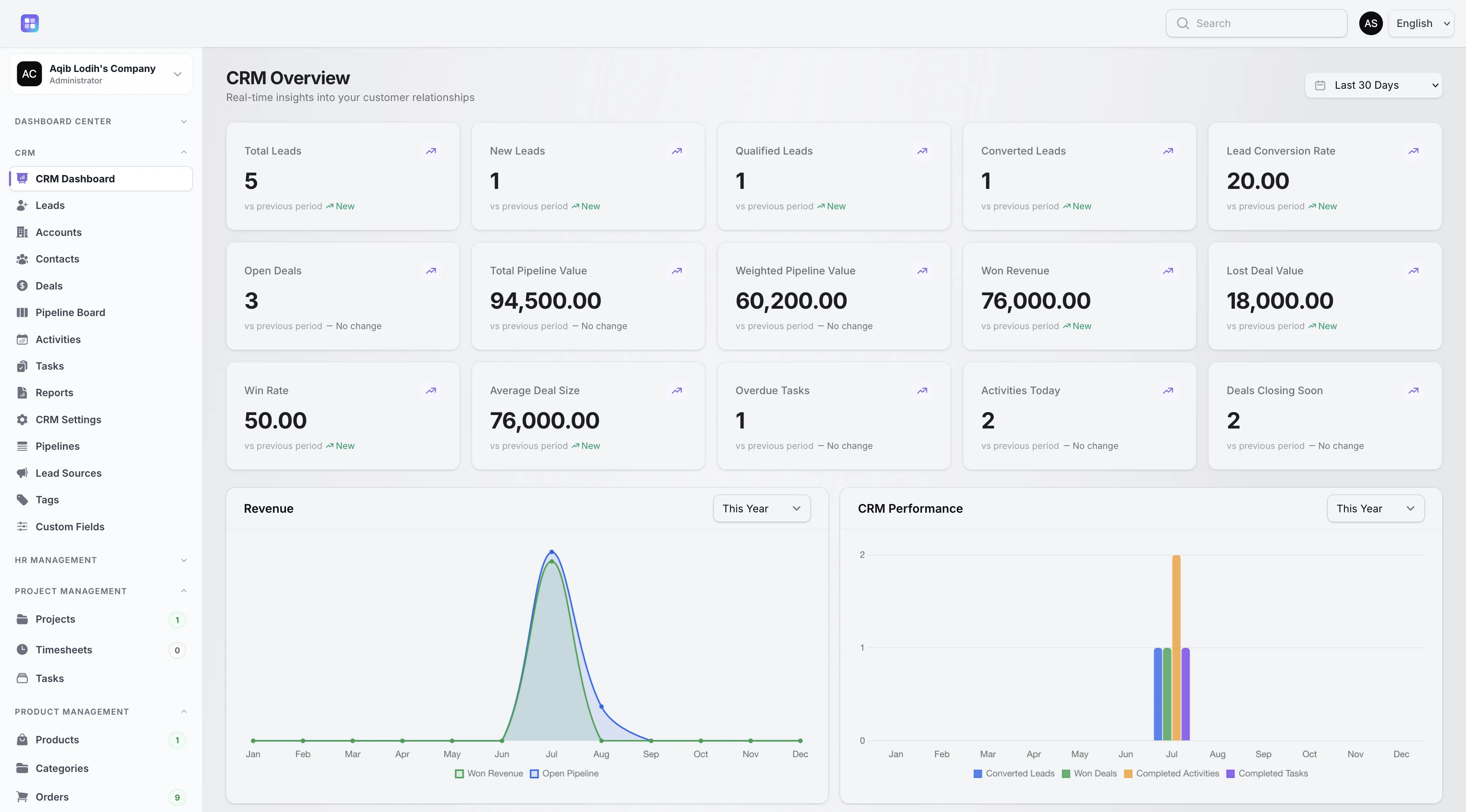
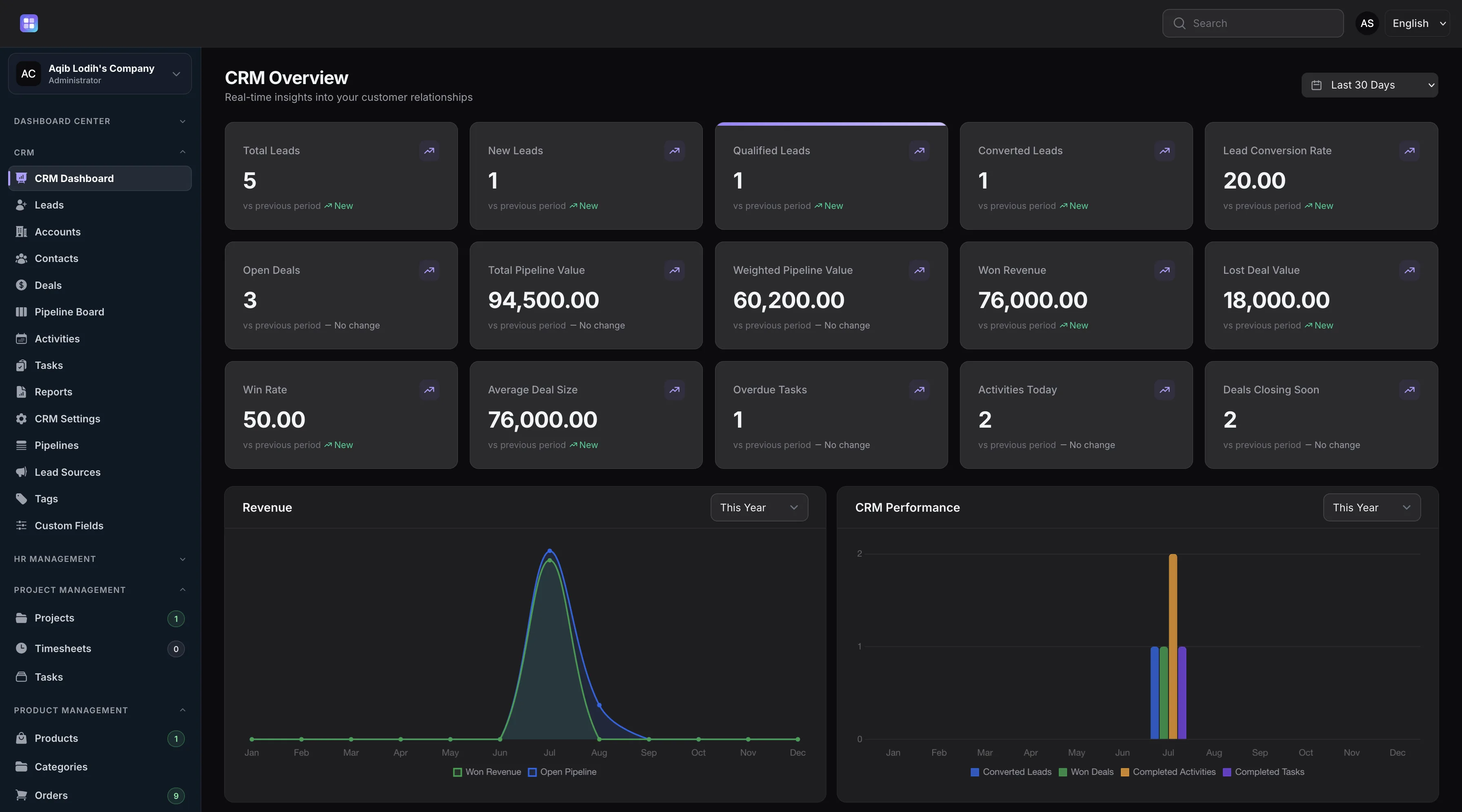
CRM metrics, charts, recent activity, and priority work from the implemented dashboard.
CRM Overview
The CRM module gives teams one place to track customer relationships from lead capture through pipeline reporting without mixing CRM claims with unrelated TenantSaaS modules.
Leads, accounts, contacts, deals, activities, tasks, notes, tags, and custom fields live in CRM-specific tables.
Records include owners, assignees, creators, statuses, timestamps, source fields, and tenant ownership.
Dashboard metrics and reports show conversion, pipeline value, weighted value, win rate, and stage totals.
Policies combine tenant membership, permissions, ownership, assignment, creator, role, and privacy checks.
Core CRM Features
Each feature below is implemented in TenantSaaS and has its own in-depth page covering capabilities, workflows, permissions, and FAQs.
Capture, assign, qualify, and convert leads with statuses, ratings, sources, and estimated values.
Keep complete people profiles with company links, contact channels, preferences, and interaction history.
Manage customer companies with industry, revenue, addresses, statuses, and connected people and deals.
Track opportunity value, probability, close dates, and stage movement through to Won or Lost.
Design multiple pipelines with ordered, typed stages and move deals across a visual board.
Log calls, emails, meetings, demos, and follow-ups with schedules, priorities, and outcomes.
Assign follow-up work with due dates, reminder times, priorities, and overdue alerts.
Review lead, pipeline, revenue, task, and activity metrics with period-over-period trends.
Measure lead source performance and per-stage pipeline totals with conversion rates.
Also Included
These capabilities ship with the CRM module and are covered in depth inside the relevant feature pages above.
Convert a lead into an account, contact, and optional deal. Conversion copies CRM tags and records a CRM activity log entry.
Add contextual notes through relation managers and mark notes private so visibility is limited to the creator.
Organize CRM records with colored tags and define custom fields for leads, accounts, contacts, and deals.
Configure ordered, activatable lead source labels per workspace and attach a source to every lead and contact.
A workspace setting enables duplicate detection so teams avoid capturing the same record twice.
CRM queries and policies scope records to the current tenant and then apply permissions, ownership, assignment, creator, and privacy rules.
Dashboard and Analytics
The CRM dashboard is powered by CrmDashboardService and date ranges including today, last 7 days, this month, last month, this year, and last 30 days.
Theme-aware CRM screenshot loaded from the existing demo media map.
Workflow
This workflow follows the implemented lead statuses, conversion action, pipeline stage types, deal statuses, events, and reports.
A lead starts as New and can be assigned to a tenant team member with source, rating, value, and contact information.
Lead statuses include Contacted and Working. Teams can add activities, notes, and follow-up tasks while qualifying the opportunity.
Qualified leads can proceed to conversion. Unqualified or Lost leads retain status and loss context.
Conversion creates or reuses an account, creates a contact, and can create an open deal in a selected pipeline stage.
Deals move through ordered stages. Open stages update probability, Won stages mark revenue won, and Lost stages require a lost reason.
Completed tasks and activities update CRM signals, clear dashboard cache, and feed dashboard metrics and reports.
CRM Resources
TenantSaaS CRM is implemented through tenant-panel Filament resources, custom pages, relation managers, policies, actions, and service classes.
Create, view, edit, delete, search, sort, filter, soft-delete, and convert leads into accounts, contacts, and optional deals.
Fields include source, assignee, status, rating, value, currency, contact methods, first contact, qualification, conversion, and lost reason. Filters include status, rating, source, assignee, unassigned, converted, and trashed records.
Explore the feature pageManage companies with owners, industry, website, email, phones, revenue, currency, billing and shipping addresses, status, and last-contacted dates.
Tables support search, sorting, status and owner filters, trashed records, and relation managers for contextual CRM work.
Explore the feature pageManage people connected to accounts, sources, owners, job details, preferred contact method, contact details, birthdays, addresses, and status.
Contacts can be searched, filtered by status/account/owner, soft-deleted, and connected back to CRM accounts and deals.
Explore the feature pageManage sales opportunities with account, primary contact, owner, source, pipeline, stage, amount, probability, close date, status, and lost reason.
Deals support filters for pipeline, stage, status, owner, closing this month, overdue, and trashed records. Stage changes write stage history.
Explore the feature pageSelect an active pipeline, review stage columns, see open count and open value, and move deals across pipeline stages.
Moving a deal validates the stage, updates probability/status, records history, and dispatches won, lost, or stage-changed events.
Explore the feature pageTrack calls, emails, meetings, demos, follow-ups, messages, and other CRM interactions.
Activities include status, priority, assignee, related record fields, schedule, location, outcome, filters, and a Complete table action.
Explore the feature pageCreate assigned CRM tasks with status, priority, related record, due date, reminder, privacy, and completion tracking.
Task tables include status, assignee, my tasks, overdue, due today, trashed filters, and a Complete table action.
Explore the feature pageCreate active/default pipelines and maintain ordered stages with probability, color, active flag, and Open/Won/Lost stage type.
Stage relation managers allow create, edit, and delete, with safeguards around stages that are already used by deals.
Explore the feature pageConfigure source labels, colored tags, and custom fields for CRM records.
Custom fields include entity type, key, field type, options, default value, required flag, active flag, sort order, and validation rules.
No CRM-specific Filament import or export actions were found in the current CRM resources.
This page intentionally does not advertise CRM import/export as a built-in module feature.
Role-Based Access
CRM access is not just role text on a landing page. It is enforced through policies and visibility services in the tenant panel.
CRM policies verify that records belong to the current tenant and that the user belongs to that tenant before allowing record actions.
Resources use permissions such as ViewAny, View, Create, Update, Delete, Restore, ForceDelete, Replicate, and Reorder for each CRM subject.
Tenant owners, users with Manage:CrmPipeline, and roles named super_admin, team_admin, or crm_manager can see all CRM sales records.
When broad access is not granted, leads, tasks, and activities are limited to assigned or created records. Accounts, contacts, and deals are limited to owner or creator.
Private notes remain visible to their creator. Private task visibility is controlled through assignment and creator filtering.
The crm_allow_sales_users_to_view_all_records tenant setting can broaden sales-record visibility for users with ViewAny:CrmLead.
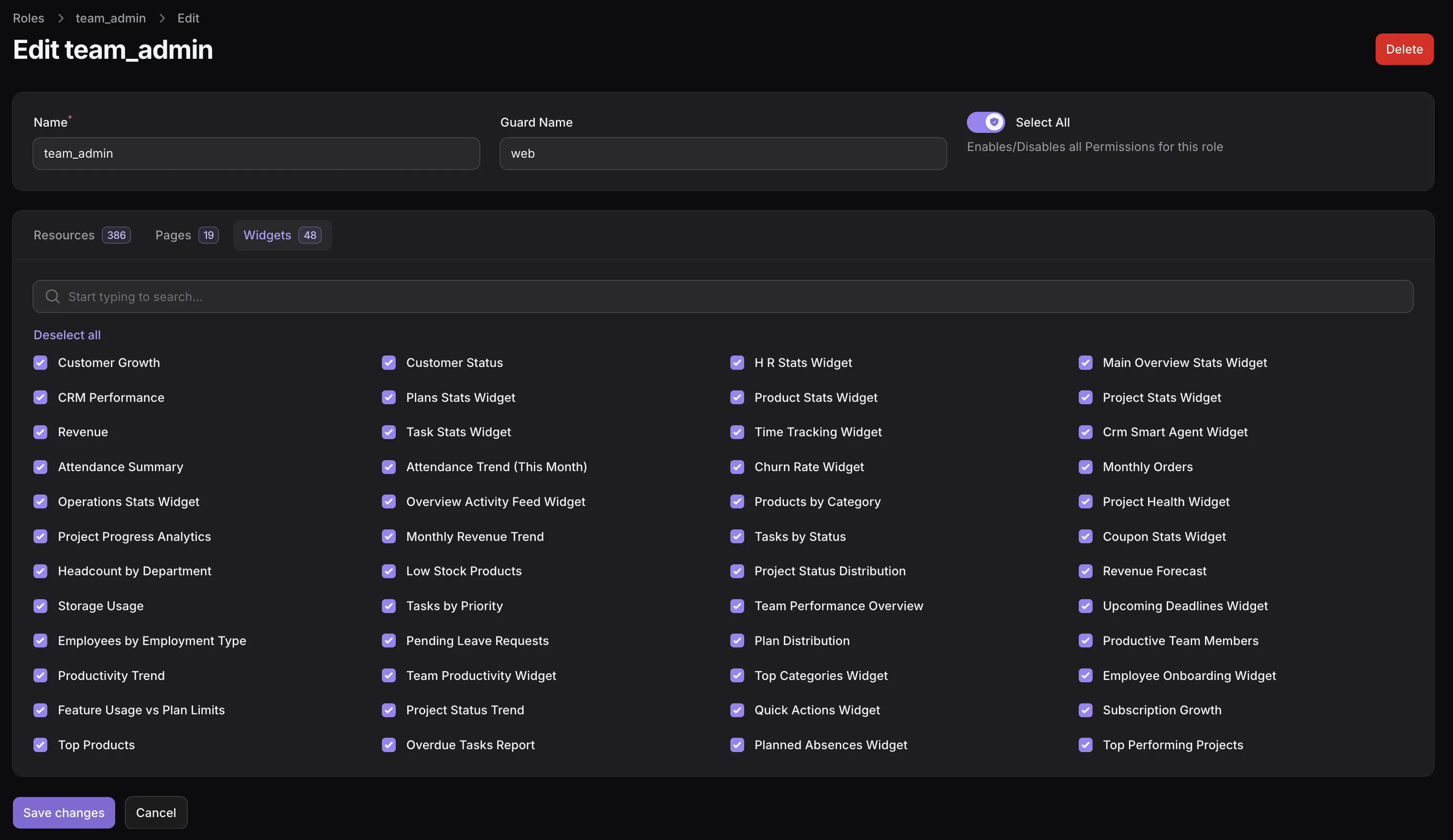
Related workspace permission screens control access to CRM resources and pages.
CRM Reports
The reports below are limited to dashboard and report services that exist in the CRM module.
Groups leads by source, counts total leads, totals converted leads, and calculates source conversion rate.
Groups deals by stage, reports deal count, stage probability, sort order, and total amount.
Compares current date-range metrics against the previous equivalent period and marks trends as up, down, or flat.
Shows lead, conversion, pipeline, revenue, deal, task, activity, and closing-soon metrics from the CRM dashboard service.
Lists recent CRM activities and priority tasks so teams can see what happened recently and what needs attention next.
The CRM dashboard loads revenue, performance, customer growth, and customer status chart widgets.
Multi-Tenant CRM
CRM tables store team_id, models use tenant-aware scopes, and page/resource access checks the active Filament tenant before users reach CRM data.
Leads, accounts, contacts, deals, activities, tasks, notes, tags, fields, pipelines, and stages include tenant ownership.
Resources and services query the current team and prevent cross-tenant stage, account, contact, owner, and record mismatches.
CRM dashboard, reports, settings, pipeline board, and unavailable pages check tenant CRM access before rendering.
CRM Automation
The CRM module includes backend automation for record changes and task reminders. This is CRM notification behavior, not a general messaging product.
Screenshots
The available CRM-specific demo media for this page is the CRM overview dashboard screenshot, with light and dark variants loaded by the existing demo-frame component.
Light and dark CRM dashboard screenshots from public/images/demo/optimized.
Related CRM Pages
Each page covers one CRM feature in detail — capabilities, workflows, connected records, permissions, and FAQs.
Documentation
No dedicated public CRM documentation route exists yet, so this page links only to existing public developer and open-source pages.
FAQ
Answers are based on the CRM implementation that exists in this codebase.
TenantSaaS CRM manages leads, accounts, contacts, deals, pipelines, pipeline stages, activities, tasks, notes, tags, custom fields, and CRM reports.
Yes. CRM tables include team ownership, CRM queries are scoped to the current tenant, and policies verify tenant membership before record access.
Lead statuses are New, Contacted, Working, Qualified, Unqualified, Converted, and Lost.
Yes. A lead can be converted into an account, contact, and optional open deal in a selected pipeline stage.
Deal statuses are Open, Won, Lost, and Cancelled. Pipeline stages are typed as Open, Won, or Lost.
Yes. The pipeline board shows active stages, open deal count, open value, deal cards, owners, accounts, close dates, and a stage move control.
The CRM reports page includes lead source performance and pipeline by stage. The CRM dashboard adds lead, conversion, pipeline, revenue, task, activity, and trend metrics.
CRM access uses tenant membership, Shield-style permissions, ownership, assignment, creator checks, private-note visibility, and a tenant setting for broader sales visibility.
Yes. The crm:send-task-reminders scheduled command runs every five minutes and sends due-soon and overdue CRM task notifications.
No CRM-specific Filament import or export actions were found in the current CRM resources.
Yes. CRM relation managers support contextual notes, and CRM custom fields can be defined for leads, accounts, contacts, and deals.
Teams create a tenant workspace, configure CRM lead sources, pipelines, stages, tags, custom fields, and permissions, then begin adding or assigning leads and deals.
Start with tenant-scoped leads, contacts, accounts, deals, pipelines, activities, tasks, reports, and role-based CRM visibility.