TenantSaaS Launches a Complete CRM Module with Built-In AI Assistance
We are excited to announce the launch of the new CRM module in TenantSaaS.
The CRM module is now available across all Free and Paid plans, including the $0 Free Plan. This means businesses can start managing their customer relationships, sales pipelines, follow-ups, activities, and deals without paying for a separate CRM platform.
The goal is simple: provide growing businesses with one centralized system for managing customers, teams, sales processes, projects, and daily operations.
A Complete CRM Inside TenantSaaS
The new CRM module gives businesses the tools they need to organize customer information and manage the full sales journey.
Users can now manage:
Leads
Contacts
Accounts
Deals
Sales pipelines
Pipeline stages
Activities
Calls and meetings
Tasks and follow-ups
Lead sources
Tags
Custom fields
CRM settings
Reports and analytics
Instead of managing leads in spreadsheets, customer details in separate tools, and tasks in another system, teams can now handle everything from one TenantSaaS workspace.
A Real-Time CRM Dashboard
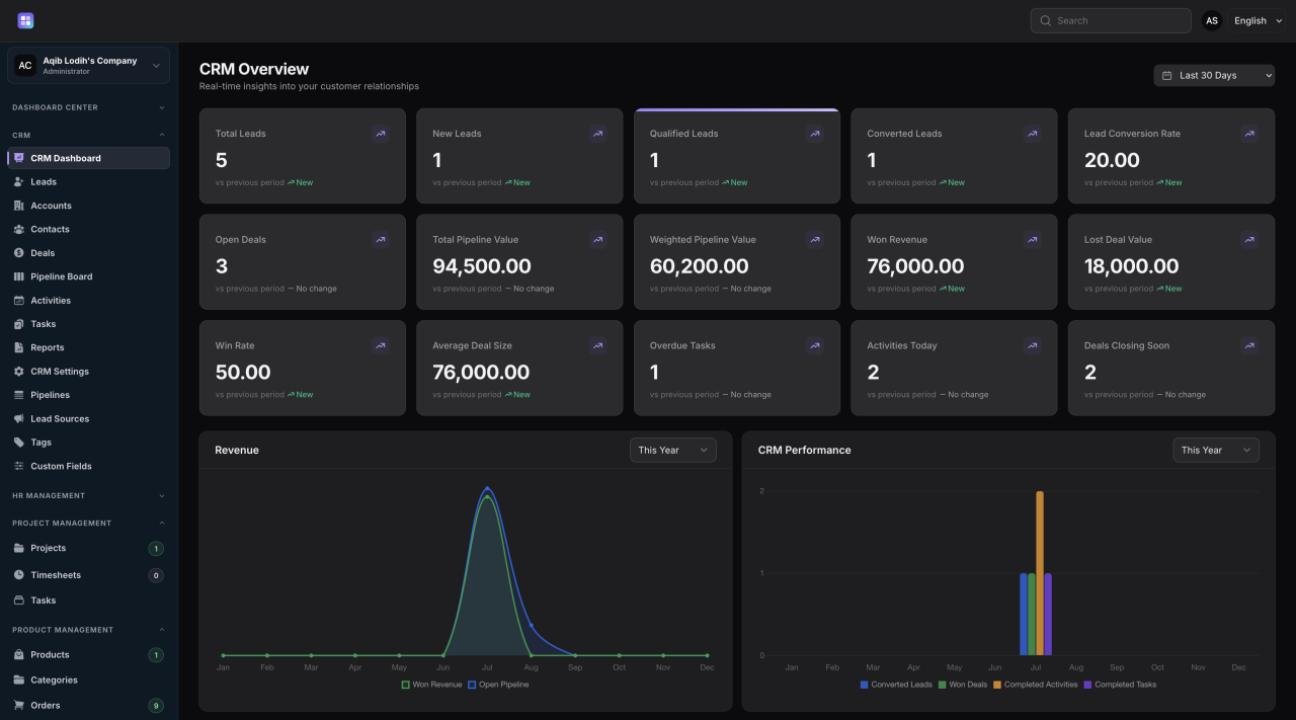
The CRM dashboard provides a clear view of sales activity and customer performance.
Businesses can monitor important metrics such as:
Total leads
New leads
Qualified leads
Converted leads
Lead conversion rate
Open deals
Total pipeline value
Weighted pipeline value
Won revenue
Lost deal value
Win rate
Average deal size
Overdue tasks
Activities due today
Deals closing soon
The dashboard also includes visual reports for revenue, pipeline performance, customer growth, recent activity, priority tasks, and customer status.
This helps teams understand what is happening in their CRM without manually reviewing every record.
Manage Leads and Contacts More Effectively
The leads and contacts areas make it easier to organize prospects and customers.
Teams can store customer information, assign owners, track lead sources, add tags, record notes, and follow each lead through the sales process.
This creates a more structured workflow and reduces the risk of losing valuable opportunities.
Track Deals Through Custom Pipelines
The pipeline system helps businesses manage deals from the first interaction to the final result.
Users can create pipelines and stages that match their own sales process. Deals can then move through stages such as:
New
Contacted
Qualified
Proposal
Negotiation
Won
Lost
Pipeline reports make it easier to identify where deals are slowing down and where the team should focus next.
Stay on Top of Activities and Tasks
CRM success depends heavily on consistent follow-up.
The new module allows users to manage calls, meetings, demos, emails, tasks, and other customer activities.
The dashboard highlights:
Overdue work
Upcoming follow-ups
Priority tasks
Recently completed activities
Deals that may require immediate attention
This gives users a practical daily view of what needs to be handled.
Built-In CRM Smart AI Agent
One of the most important features of the new CRM module is the CRM Smart AI Agent.
The Smart Agent is built using the Laravel AI SDK and supports multiple configured AI providers.
Users can select their preferred AI provider directly from the CRM widget and ask questions about their CRM data.
The agent can help with tasks such as:
Identifying leads that need attention
Highlighting pipeline risks
Finding overdue activities and tasks
Reviewing CRM performance
Prioritizing important work
Suggesting follow-up actions
Drafting professional customer responses
Summarizing deals and activities
The Smart Agent is designed to help users make faster decisions while keeping CRM work inside the same dashboard.
Smart Responses for Customer Communication
Writing customer replies can take time, especially when a team handles many leads and deals.
The CRM Smart Agent can help users prepare professional draft responses based on the situation.
For example, it can help draft:
Follow-up messages
Proposal responses
Meeting confirmations
Sales replies
Deal-status updates
Customer support responses
These responses remain under the user’s control, helping teams save time without automatically sending messages.
Multi-Tenant and Permission-Aware
TenantSaaS is a multi-tenant platform, so each company’s CRM information remains isolated within its own workspace.
The CRM module follows tenant-level access rules and user permissions. This means team members only see the records and actions they are authorized to access.
The system is designed to support growing teams while maintaining clear separation between companies.
Included in Every TenantSaaS Plan
The complete CRM module is available in:
Free Plan
Pro Plan
Business Plan
Even businesses using the $0 Free Plan can begin managing leads, contacts, deals, pipelines, activities, and tasks.
As the business grows, it can upgrade for additional TenantSaaS capabilities while keeping its CRM data and workflows in the same platform.
Why We Built the CRM Module
Many small and growing businesses use several disconnected tools to manage their work.
They may use one platform for leads, another for projects, another for employees, and spreadsheets for reporting.
TenantSaaS is being developed to reduce that fragmentation.
By adding CRM directly into the platform, businesses can manage customer relationships alongside other operational areas, including:
Teams
Employees
Projects
Products
Notifications
Business workflows
Internal operations
This provides a more connected view of how the business is performing.
Start Managing Your CRM for Free
The new CRM module is now available inside TenantSaaS.
Businesses can start with the Free Plan, organize their customer relationships, track deals, manage daily activities, and use the built-in Smart AI Agent from one centralized platform.
Start free and scale as your business grows.
Visit tenantsaas.com to explore TenantSaaS and start using the CRM module.