Built for outbound teams
Founders, agencies, and small sales-and-marketing teams that research businesses, reach out, and follow up every week.
Marketing feature
TenantSaaS Marketing turns scattered prospect lists into an organized workflow: convert discovered businesses into structured leads, group them into targeted campaigns, prepare email and WhatsApp outreach that is always reviewed before it sends, and track every follow-up to a clear outcome.
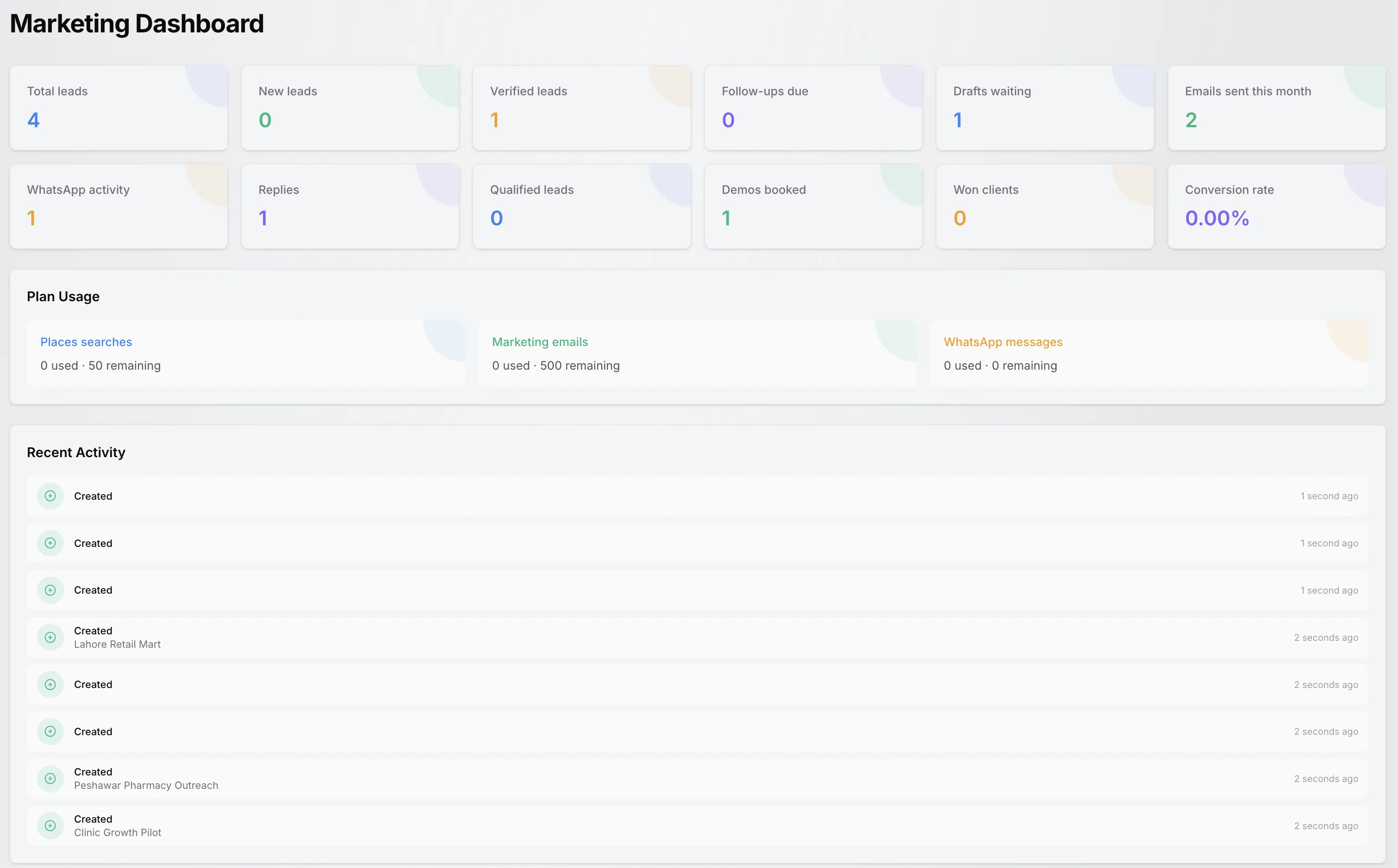
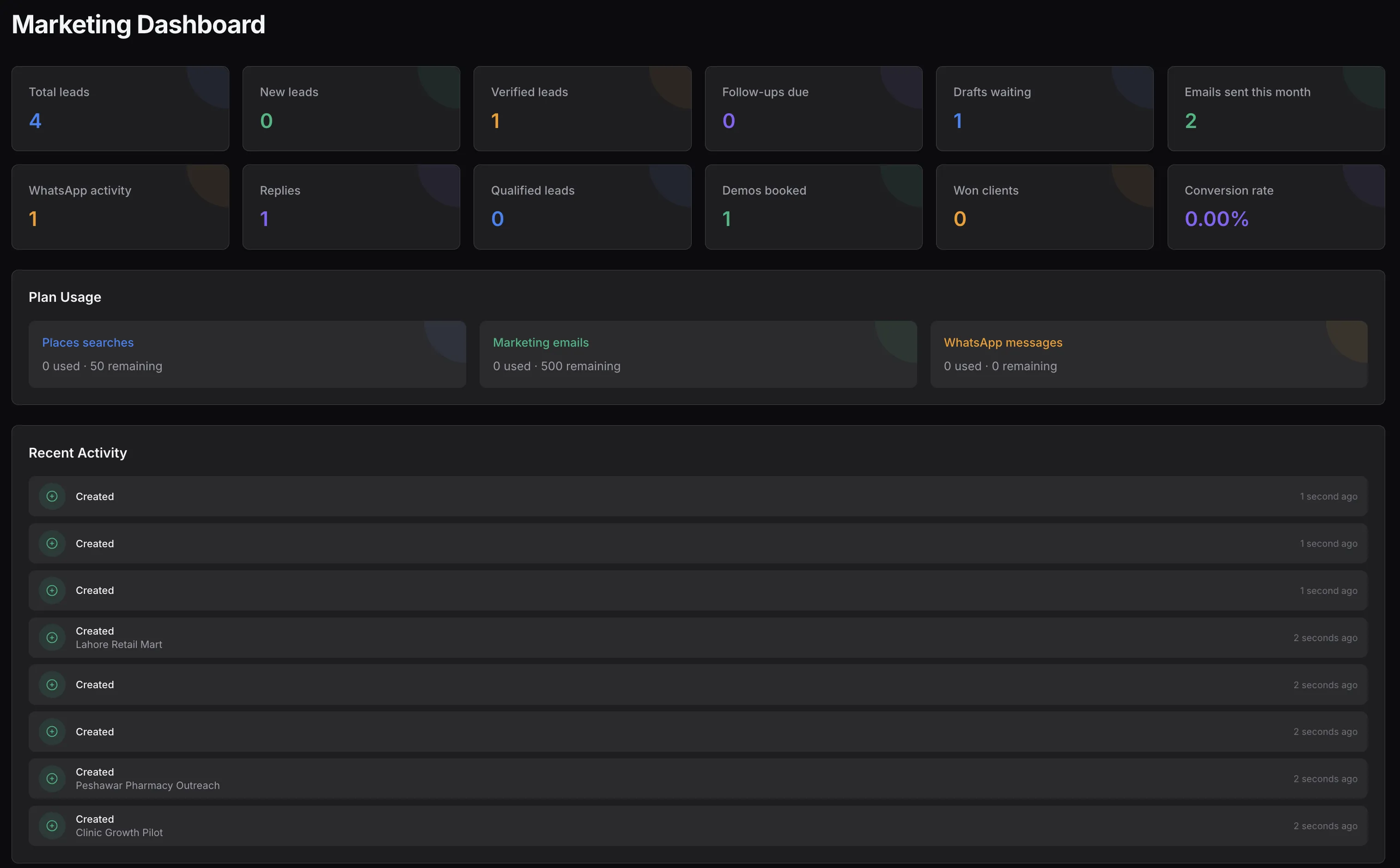
The implemented Marketing dashboard with lead metrics, outreach activity, plan usage, and recent marketing activity.
Marketing Overview
TenantSaaS Marketing is a lead and campaign workspace inside the tenant panel. It replaces the spreadsheet-plus-inbox shuffle with one place where prospects become leads, leads join campaigns, and every outreach attempt is reviewed and tracked.
Founders, agencies, and small sales-and-marketing teams that research businesses, reach out, and follow up every week.
Discovered prospects become leads with contact, location, consent, campaign, and ownership details — not another copy-pasted row.
Consent statuses, do-not-contact flags, and an approval step on every attempt keep outreach deliberate and reviewable.
Leads, campaigns, outreach history, and usage meters belong to the active workspace and follow its permissions and plan.
The Marketing Workflow
This is the actual workflow implemented in TenantSaaS Marketing — every step below maps to real statuses and actions in the module.
Search a connected lead source such as Google Places or Apollo and review the business results it returns.
Inspect business details, save promising references, and move leads through researching and verified statuses.
Turn a suitable result into a structured lead with contact, location, consent, and source details.
Group leads into a campaign with a target business type, target location, owner, and timeline.
Generate an email or WhatsApp draft from an active outreach template, rendered per lead.
Every attempt is reviewed first: approve it immediately or approve it with a scheduled send time.
Queue approved emails, open WhatsApp with the drafted message, and track sent, delivered, replied, or failed states.
Record replies, mark leads qualified, schedule demos, and finish each lead as won, lost, or do not contact.
Marketing Dashboard
The Marketing dashboard summarizes leads, outreach, results, and plan usage for the active workspace. The screenshot shows demonstration data from a demo workspace.
Lead totals, follow-ups due, drafts waiting, monthly channel activity, conversion rate, plan usage meters, and recent activity.
Total, new, and verified lead counts show how much raw opportunity is in the workspace right now.
Follow-ups due and outreach drafts waiting for approval surface the next actions for your team.
Emails sent this month and WhatsApp activity keep channel volume visible against your plan.
Replies, qualified leads, demos booked, won clients, and the conversion rate summarize outcomes.
Places searches, marketing emails, and WhatsApp messages show used and remaining monthly allowances.
A live activity feed lists the latest lead, campaign, and outreach changes in your workspace.
Prospect Discovery
Prospect Discovery searches a connected lead source — such as Google Places for local businesses or Apollo for people and organizations — and lets you review each result before it becomes a lead.
Choose among the lead sources your workspace has configured and run one complete search query against it.
Results show the business name, address, category, and operational status, with a details view for a closer look.
Keep promising references for later, shortlist candidates, or dismiss results that do not fit your campaign.
One action turns a suitable result into a structured marketing lead — with duplicate detection guarding your list.
Contact details depend on what the connected provider returns for each result — discovery does not guarantee a verified email or phone number for every business.
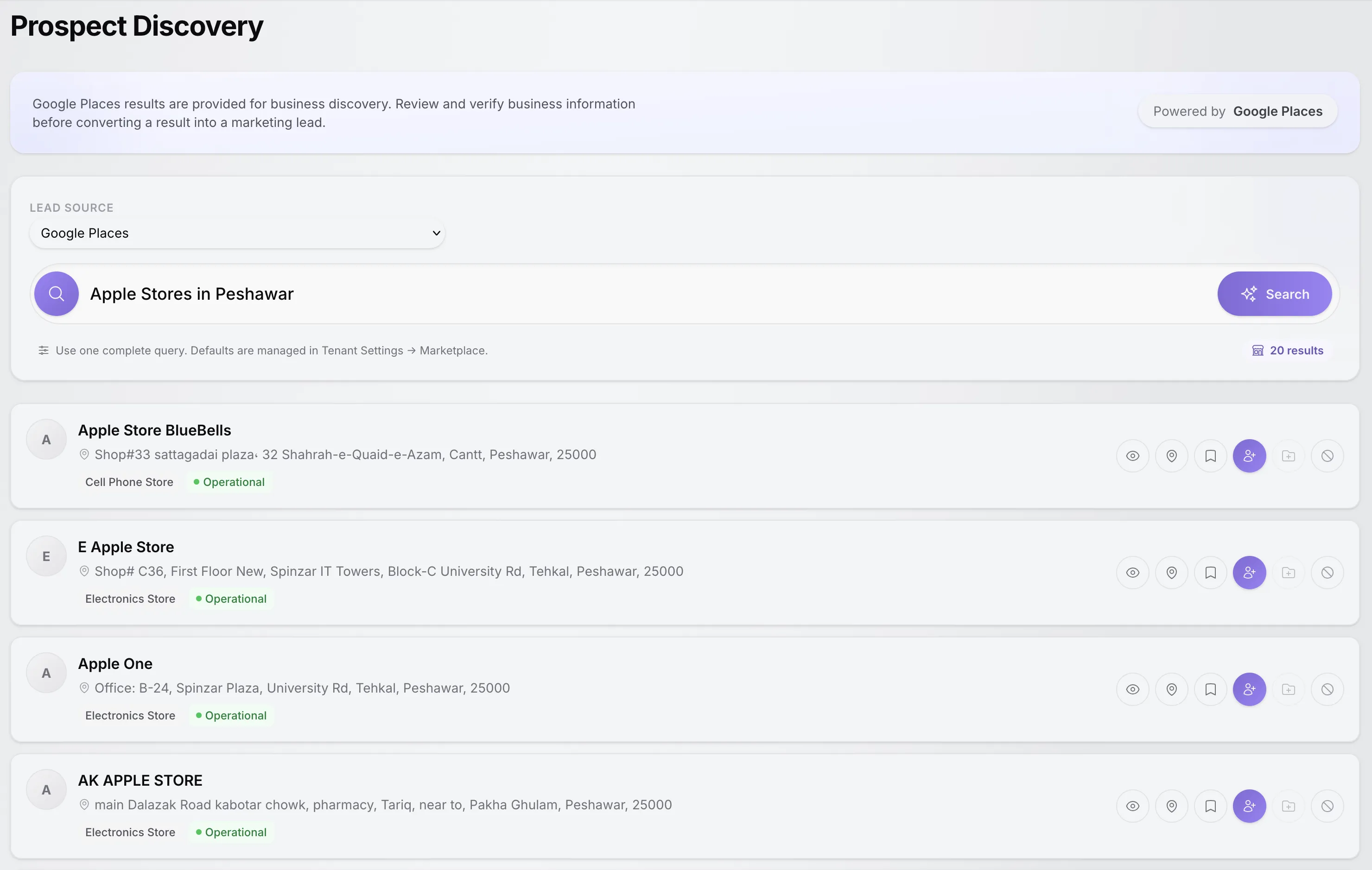
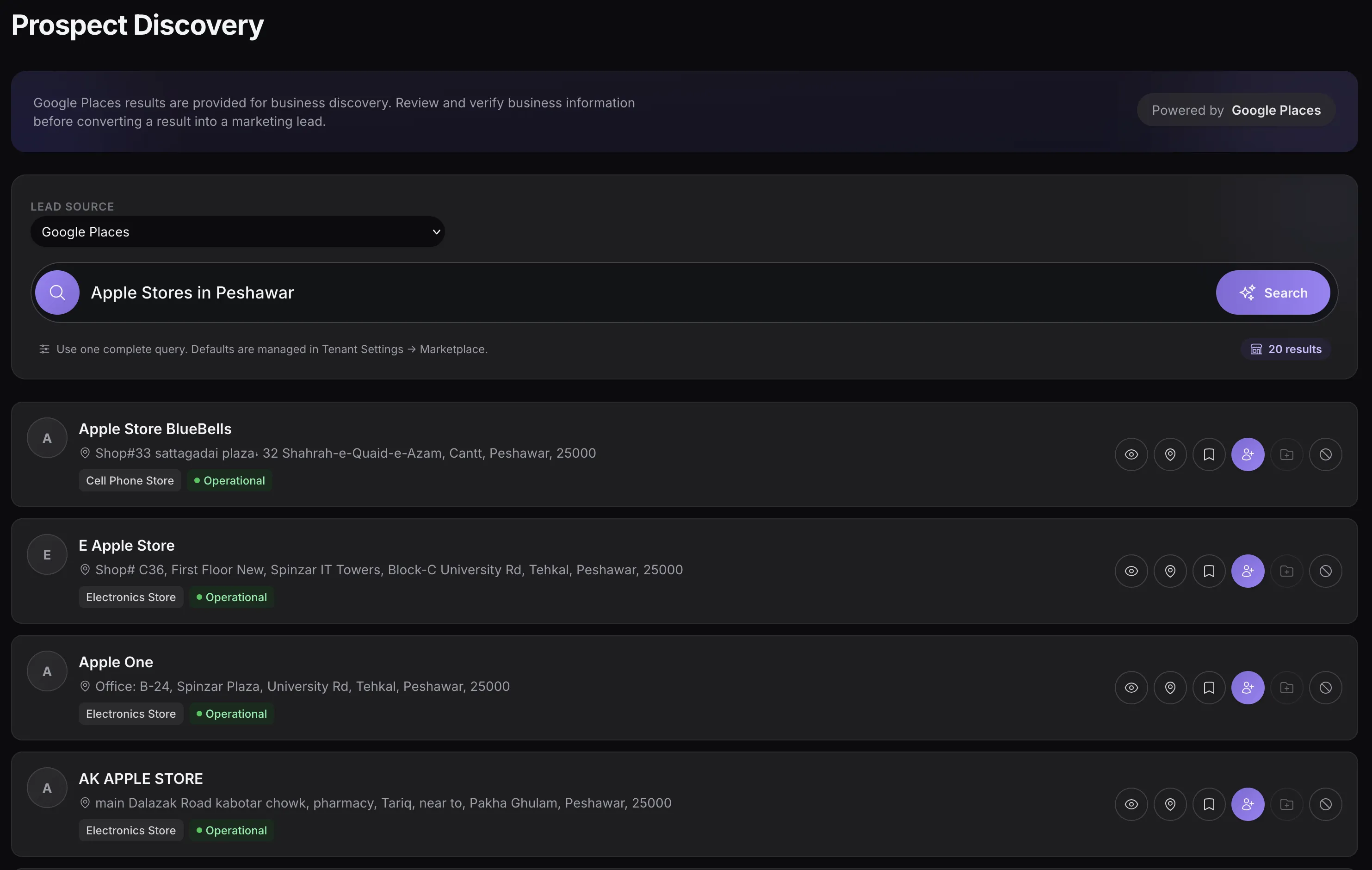
Searching a connected business source, with per-result actions to view details, save a reference, or convert it into a marketing lead.
Marketing Leads
The Marketing Leads list is the working heart of the module: complete records, clear ownership, and one action menu that covers the whole lead lifecycle.
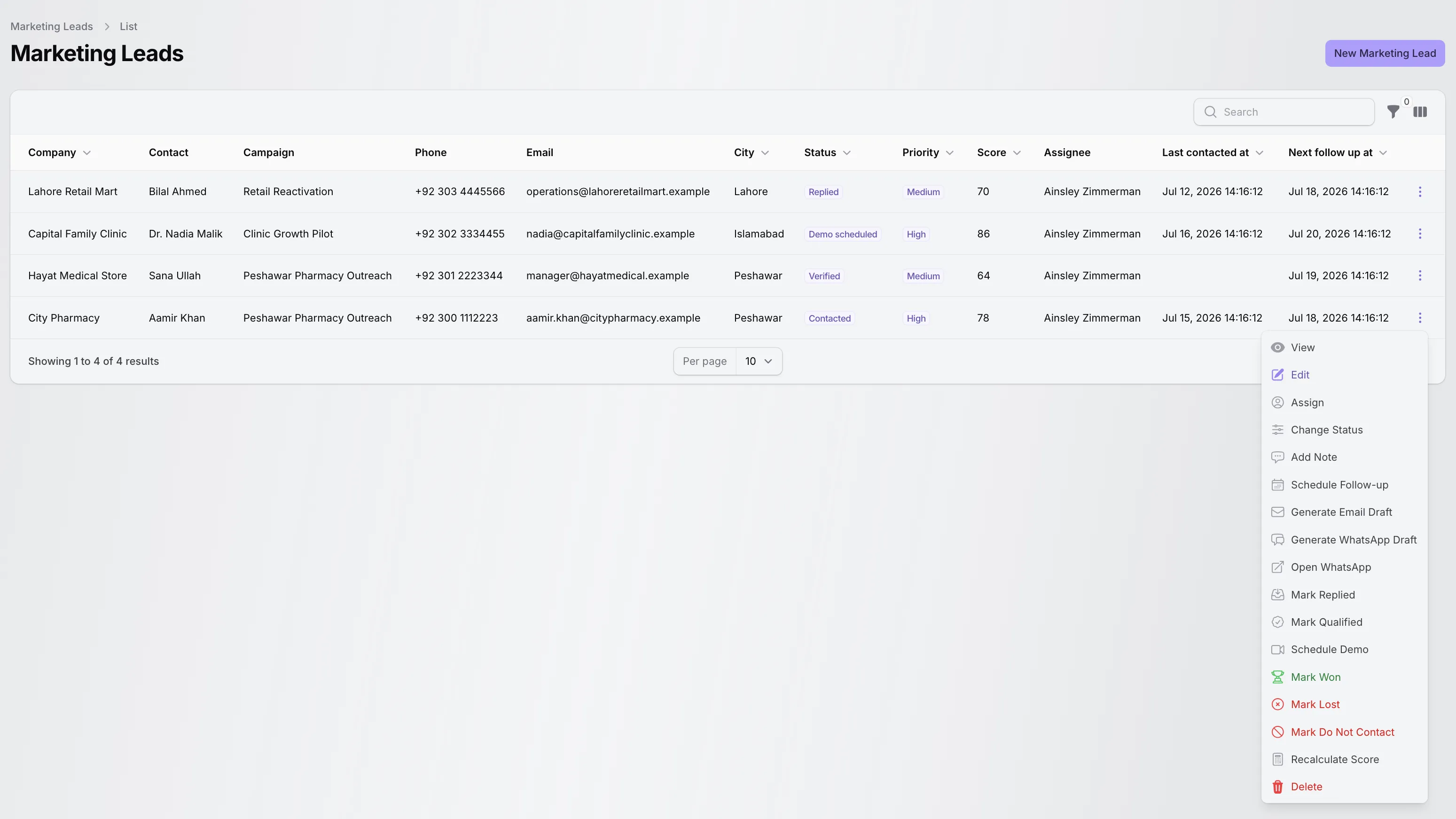
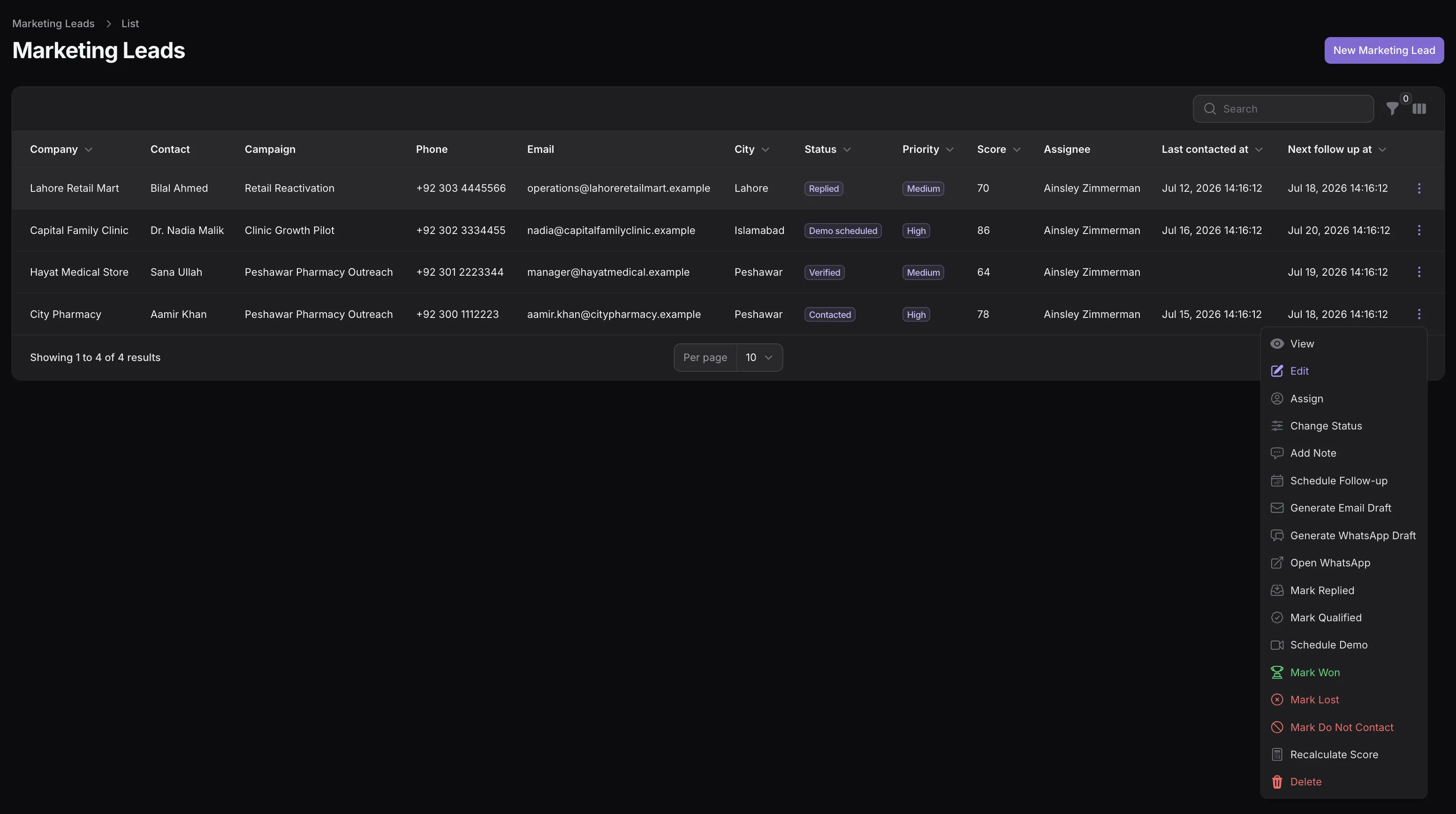
Company, contact, campaign, status, priority, score, assignee, and follow-up dates — with the full lead action menu open.
Company, contact, job title, phone, WhatsApp number, email, website, and full location details in one place.
Assign each lead to a workspace member so responsibility for the next touch is always clear.
Thirteen workflow statuses, four priority levels, and a 0–100 score keep the list ordered by what matters.
Last-contacted and next-follow-up dates, plus a follow-up-due filter, keep commitments from slipping.
Email and WhatsApp consent statuses and a do-not-contact state with a recorded reason keep outreach respectful.
Timestamped notes, the original source, and source URL preserve the context behind every lead.
Marketing Campaigns
Campaigns give a set of leads a shared target, owner, and timeline — and report contacted, replied, qualified, and won counts as the work happens.
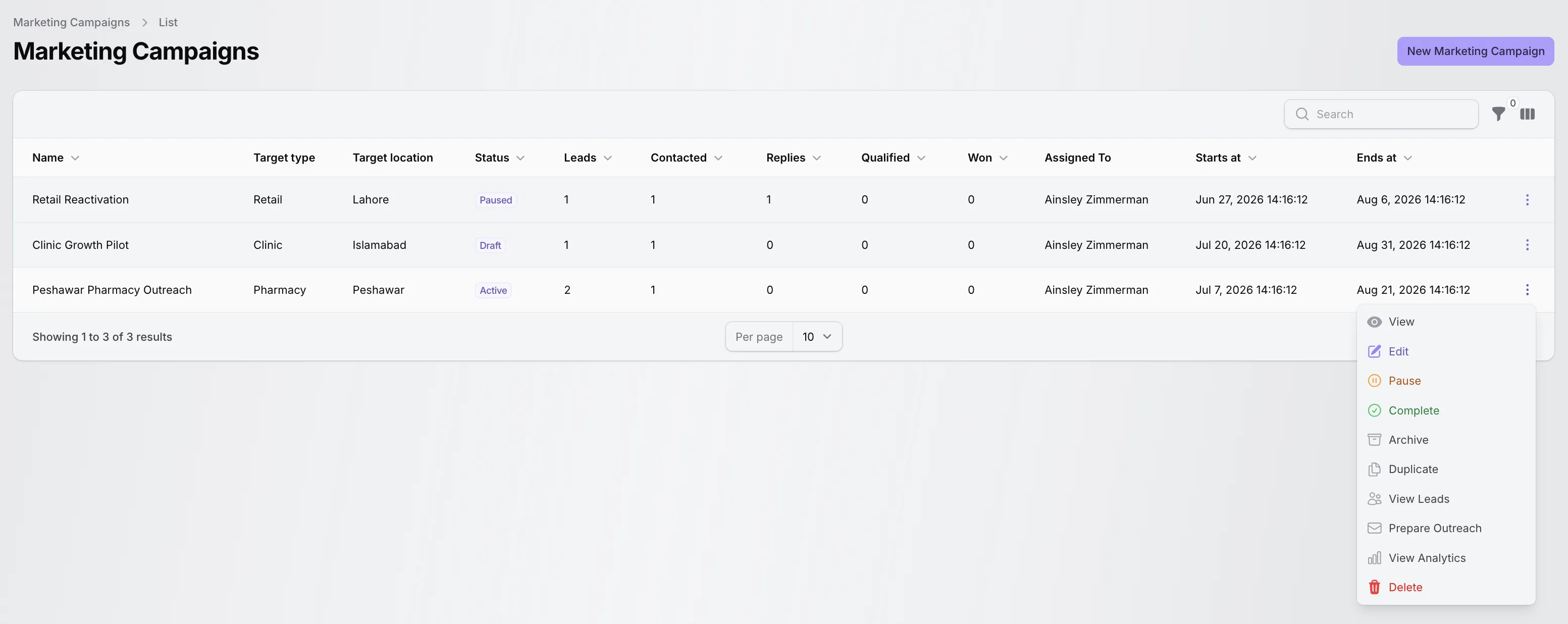
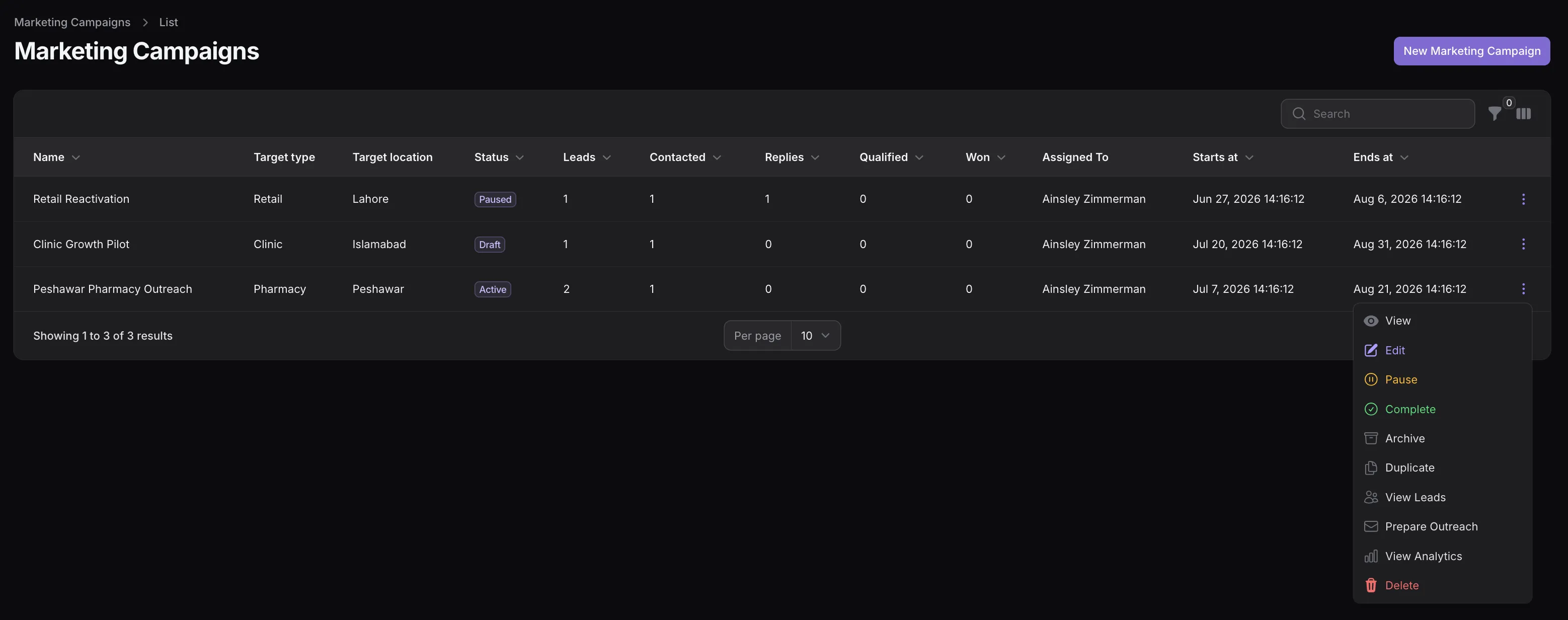
Campaigns with target type and location, lifecycle status, per-campaign lead progress counts, and the campaign action menu.
Give each campaign a target business type, target location, goal, and start and end dates.
Move campaigns through draft, active, paused, completed, and archived — with pause, resume, complete, and archive actions.
Lead, contacted, replied, qualified, and won counts appear per campaign, with reply and conversion rates on the campaign view.
Optional daily email and WhatsApp limits keep automated draft preparation inside sensible sending volumes.
Assign a campaign owner, and duplicate a campaign to reuse its targeting for the next push.
View a campaign's leads or open its analytics view without leaving the campaign list.
Outreach Preparation and Tracking
Outreach attempts are individual, reviewable records — one lead, one channel, one rendered message — with approval and scheduling built into the workflow.
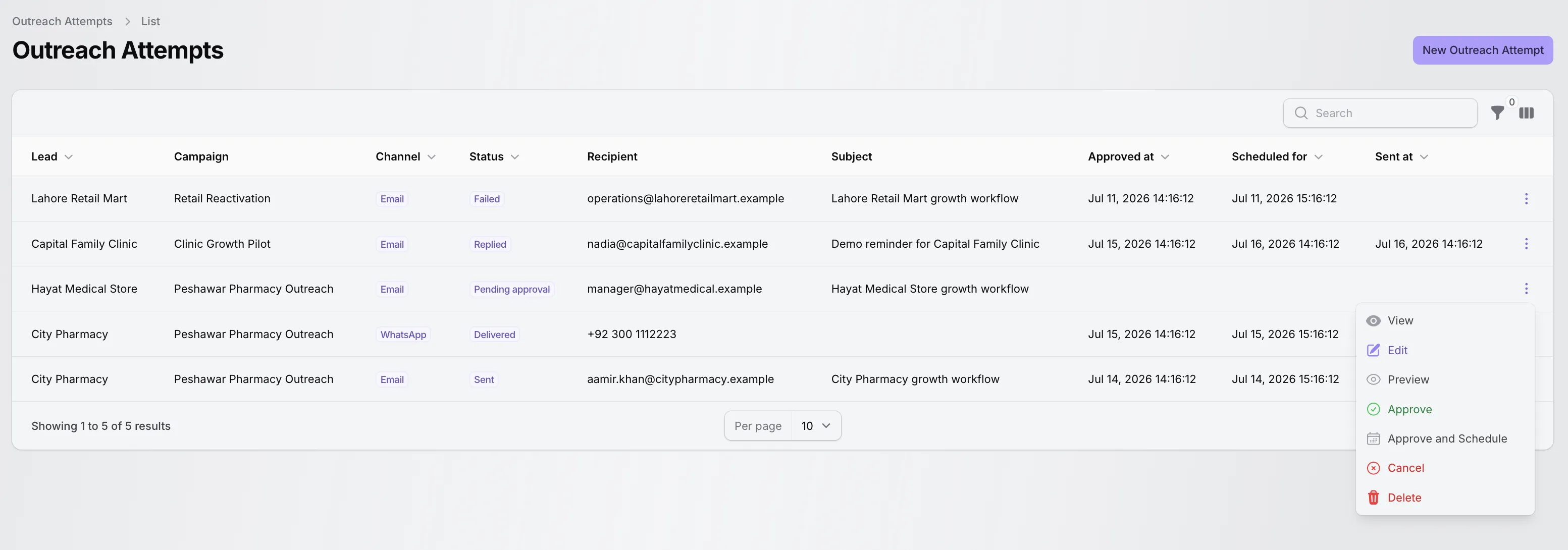
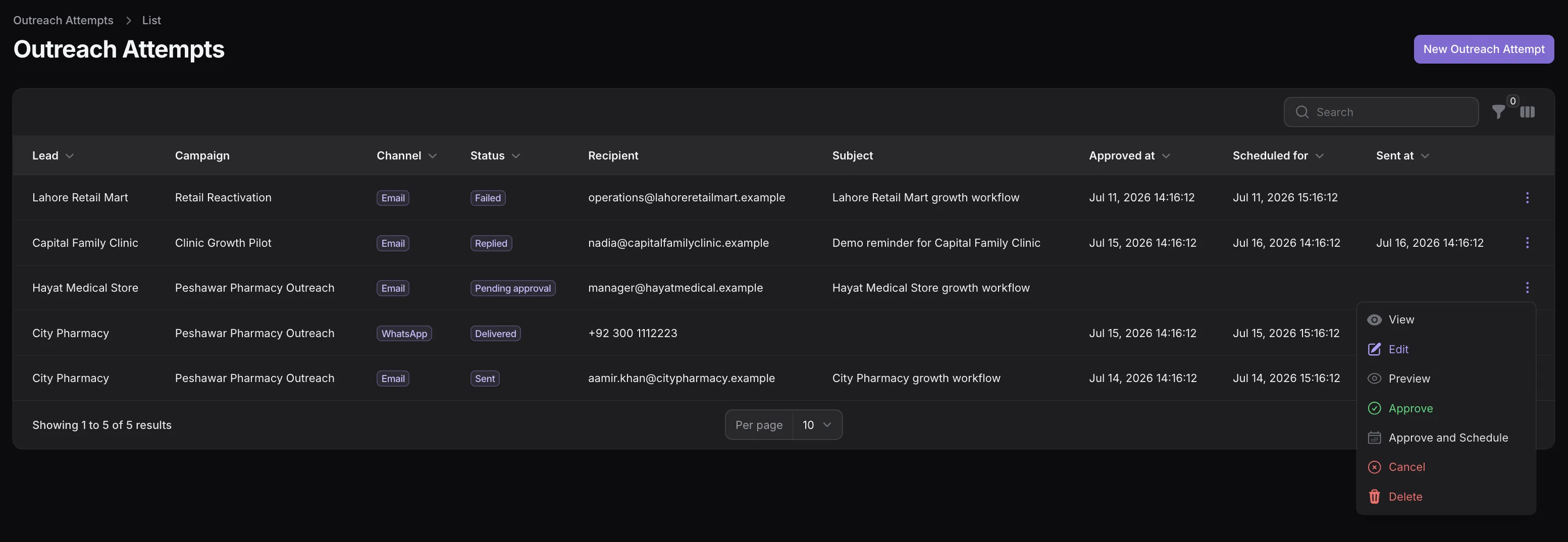
Attempts across email and WhatsApp with pending-approval, sent, delivered, replied, and failed statuses, plus approve and schedule actions.
Drafts are rendered from reusable outreach templates — shared or workspace-specific — with per-lead details filled in.
Attempts start as drafts or pending approval. A permitted teammate approves each one, optionally with a scheduled time.
Approved email attempts are queued and sent through your configured mail setup, then marked sent or failed with the reason.
WhatsApp drafts open in WhatsApp with the message pre-filled via a wa.me link — you send it, then record the manual send.
Each attempt tracks draft, pending approval, approved, scheduled, sent, delivered, read, replied, failed, cancelled, and skipped states.
A scheduled task prepares new drafts for eligible leads every day, respecting consent, do-not-contact flags, and campaign daily limits.
WhatsApp outreach is deliberately manual-assist: TenantSaaS drafts the message and opens WhatsApp for you — it does not send WhatsApp messages automatically through an API provider.
Status, Priority, and Scoring
Every lead carries a status, a priority, and a score, so the list can always be sorted and filtered by what deserves attention next.
Leads progress through research, verification, outreach, reply, qualification, demo, and proposal stages to a final won, lost, not-interested, or do-not-contact state.
Low, medium, high, and urgent priorities separate the must-touch leads from the long tail.
A scoring service rates each lead from its record, and a recalculate action refreshes the score after details change.
Mark replied, mark qualified, schedule a demo, and close leads as won or lost — each action updates the lead and its timestamps.
These are the actual statuses a marketing lead can hold in TenantSaaS:
Plan Usage and Limits
Access to the Marketing module and its monthly allowances are plan-based, and usage is tracked per workspace so the numbers on the dashboard always reflect your own activity.
Prospect searches, marketing emails, and WhatsApp messages are recorded as monthly usage for the active workspace.
The dashboard's plan-usage meters show used and remaining amounts for each metric under your current plan.
Searches and outreach check remaining allowance first, so a workspace at its limit gets a clear message instead of a surprise.
Specific allowances depend on the plan you choose — see the TenantSaaS pricing section for current plans.
Connected Prospect Sources
Google Places and Apollo are separate TenantSaaS integrations that feed the Marketing workflow. Each is configured on its own and used through Prospect Discovery when available to your workspace.
Integration
Connect Google Places for local business discovery: search businesses by query, review their name, address, category, and operational status, save references, and convert verified results into TenantSaaS marketing leads.
Integration
Connect Apollo for professional prospect workflows: search people and organizations, request enrichment, save or shortlist prospects as marketing leads, and monitor requests, results, reported credits, rate limits, and errors from a dedicated usage dashboard.
When Apollo is connected, workspace administrators get an operational view of the integration: total requests and results, enriched records, credits reported by Apollo for completed requests, rate-limit hits, usage broken down by operation, and recent errors with their error codes.
The screenshot shows demonstration data. Remaining allowances shown in TenantSaaS are plan-based; reported credits are values returned by Apollo, not your Apollo account balance.
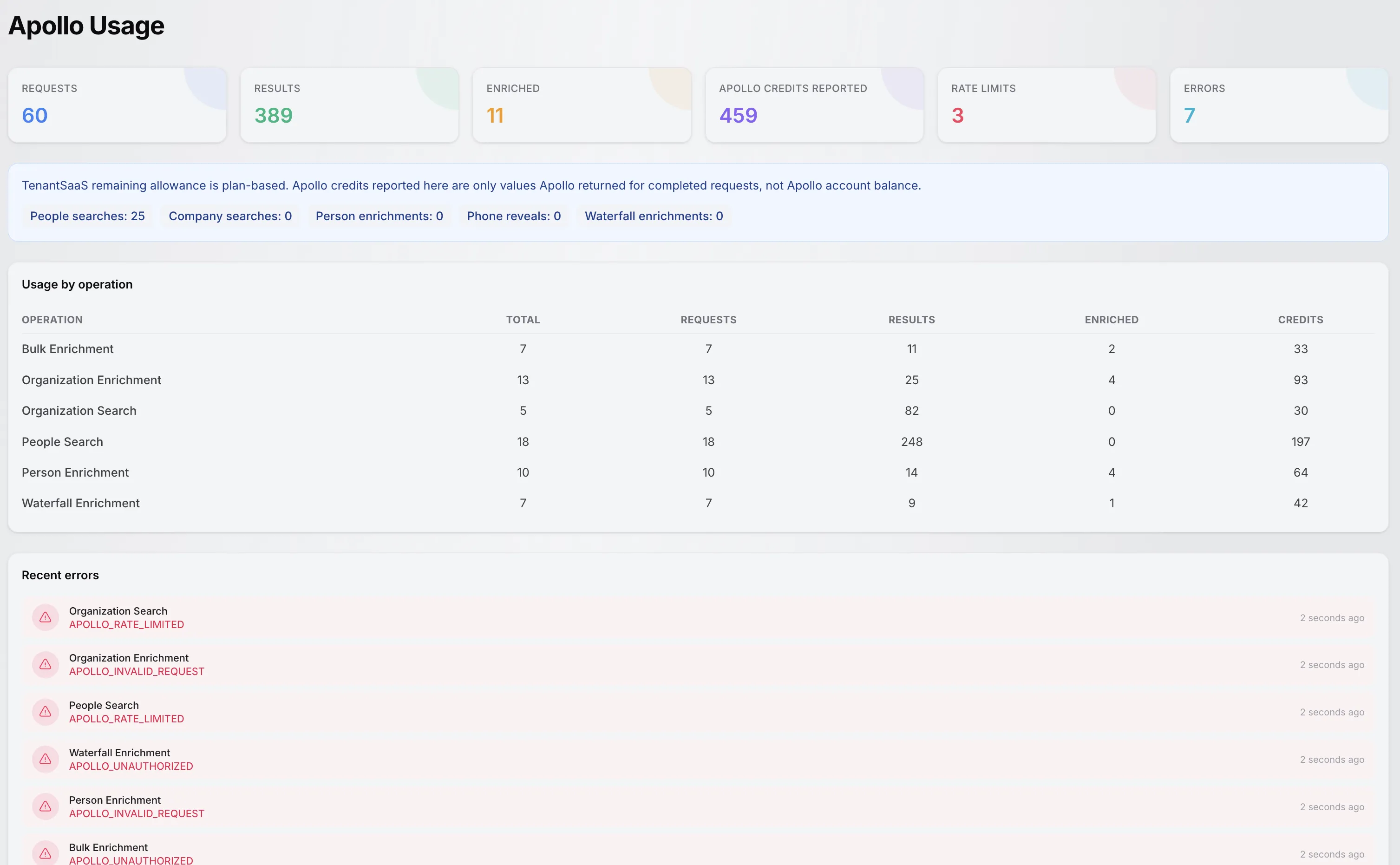
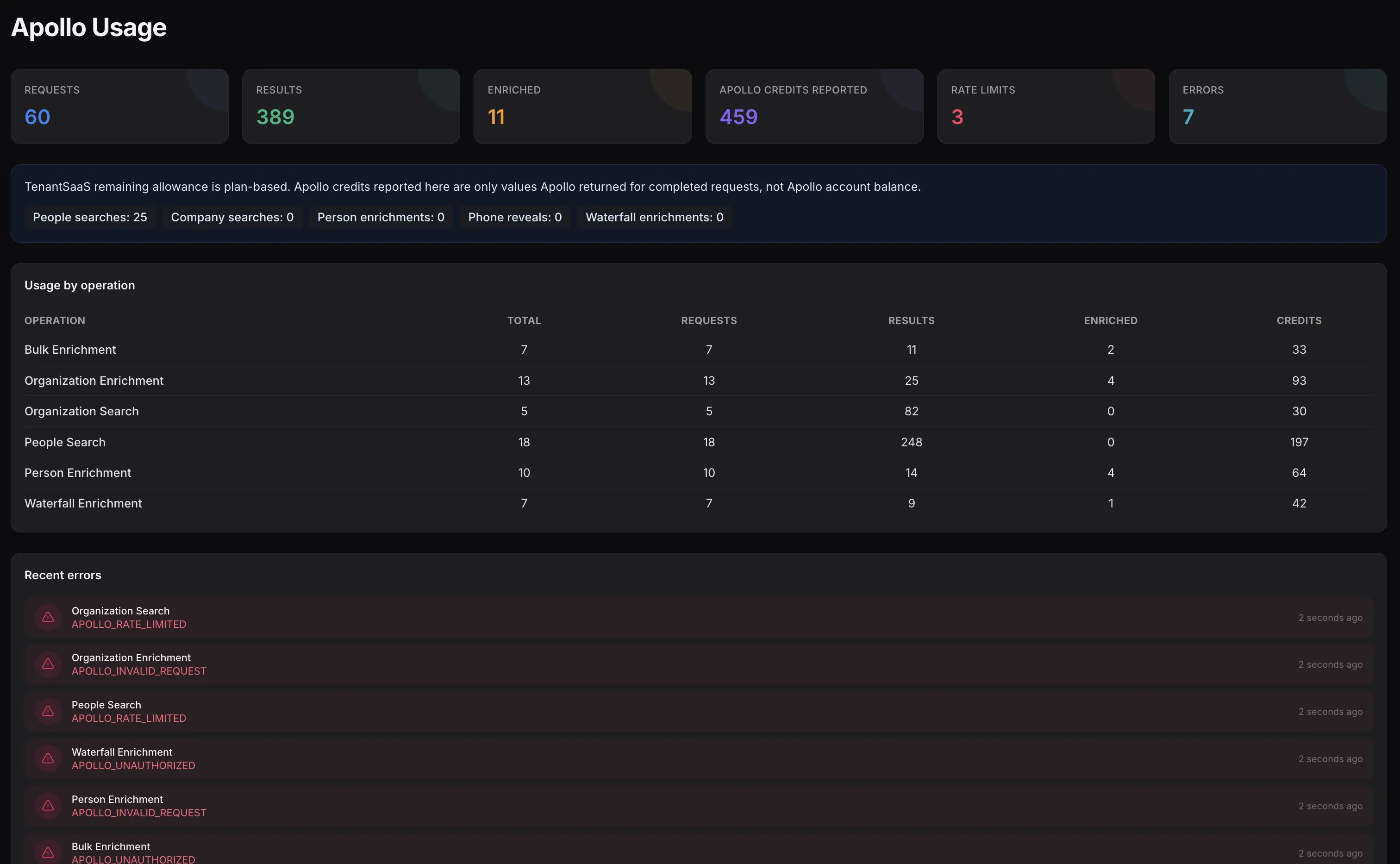
Requests, results, enrichments, reported credits, rate limits, usage by operation, and recent integration errors.
Practical Use Cases
Each of these flows uses only functionality implemented in the module today.
Search a connected local-business source for a niche in your city, review the results, and convert suitable businesses into marketing leads.
Group pharmacy, clinic, retail, or other targeted leads into one campaign with its own owner, timeline, and daily limits.
Assign leads, schedule the next follow-up, and use the follow-ups-due view to catch every record that needs attention today.
Prepare an email or WhatsApp draft from a template, review the rendered message, and approve or schedule it before anything reaches the prospect.
Record replies, recalculate scores, mark leads qualified, book demos, and close each one as won, lost, or do not contact.
Teams, Permissions, and Tenancy
Marketing follows the same permission system and workspace boundaries as the rest of TenantSaaS.
Workspace owners control which members may view, create, update, or delete leads, campaigns, templates, and outreach records through the existing permission system.
Assigning leads, approving outreach, and sending approved emails are separate permissions, so review stays with the people you choose.
Leads, campaigns, outreach attempts, and search history belong to the workspace that created them, and queries are scoped to the active workspace.
Usage metrics and plan allowances are calculated per workspace, so one team's activity never consumes another's limits.
Benefits
Practical gains grounded in what the module actually does — no invented growth percentages.
Prospect discovery, leads, campaigns, outreach, and follow-ups live together instead of in scattered spreadsheets and tabs.
The approval-first outreach workflow means a person checks every message before it is queued or scheduled.
Due follow-ups appear on the dashboard and in lead filters, so warm conversations do not go cold quietly.
Consent tracking and do-not-contact states are built into leads and enforced by the outreach eligibility checks.
Campaign counters, reply and conversion rates, and the marketing dashboard show what is actually working.
Searches, emails, and WhatsApp messages are tracked monthly against your plan, with remaining allowances always visible.
One Workspace
TenantSaaS Marketing does not eliminate every external tool, but it puts the prospect-to-outcome workflow in one place.
Every record stays in your workspace, reviewable by the whole team.
Documentation
No dedicated public Marketing documentation route exists yet, so this page links only to existing public developer and open-source pages.
FAQ
Answers are based on the Marketing implementation that exists in this codebase.
TenantSaaS Marketing is a workspace module for discovering prospects, organizing marketing leads, running targeted campaigns, preparing approval-based email and WhatsApp outreach, and tracking every lead from first contact to won, lost, or do-not-contact.
Each lead stores company, contact, phone, WhatsApp, email, website, and location details together with a campaign, an assignee, one of thirteen workflow statuses, a priority level, a 0–100 score, consent statuses, notes, and follow-up dates.
Yes. Campaigns have a target business type, target location, goal, owner, start and end dates, optional daily email and WhatsApp limits, and a lifecycle of draft, active, paused, completed, and archived.
Yes. Both leads and campaigns can be assigned to workspace members, and an assign action on each lead lets permitted users change ownership at any time.
Yes. A schedule-follow-up action records the next follow-up date and an optional note, a follow-up-due filter finds overdue records, and the marketing dashboard shows how many follow-ups are currently due.
Email and WhatsApp have full workflows: approved emails are queued and sent, while WhatsApp drafts open in WhatsApp with the message pre-filled so you send it yourself and record the manual send. Outreach templates can also hold SMS and phone-script content for drafts.
Yes. Every outreach attempt starts as a draft or pending approval, and a teammate with the approve permission must approve it — immediately or with a scheduled time — before an email can be queued or a WhatsApp message opened for sending.
No, by design. A scheduled daily task prepares drafts for eligible leads within campaign daily limits, but nothing is sent without human approval, and WhatsApp messages are always sent manually by you through a pre-filled link.
Yes. Mark-replied and mark-qualified actions update the lead, outreach attempts track replied and delivered states, and campaigns show contacted, replied, qualified, and won counts with reply and conversion rates.
Yes, as a connected integration. Prospect Discovery can search a configured Google Places connection for local businesses, show business details, and convert suitable results into marketing leads. Google Places itself remains a separate integration with its own configuration.
Apollo is a separate connected integration. When configured, Prospect Discovery can search people and organizations, request enrichment, and save results as marketing leads, while an Apollo usage dashboard shows requests, results, reported credits, rate limits, and recent errors.
Yes. Marketing access itself is plan-based, and monthly allowances for prospect searches, marketing emails, and WhatsApp messages are tracked per workspace, with used and remaining amounts shown on the marketing dashboard.
Yes. Leads, campaigns, outreach attempts, and usage records belong to the workspace that created them, queries are scoped to the active workspace, and permissions are checked per user within that workspace.
Yes. Dedicated actions mark a lead won or lost with confirmation, and a do-not-contact action records the reason and blocks further outreach drafts and WhatsApp links for that lead.
No. General email and template management are separate TenantSaaS capabilities. Marketing focuses on outreach attempts: preparing a draft from an outreach template, approving it, queuing the send, and tracking its status.
Discover prospects, organize marketing leads, run focused campaigns, and track approval-based outreach from one workspace that respects your plan and your permissions.