Managing customer relationships is not only about storing leads and deals.
Teams also need to understand which opportunities require attention, which tasks are overdue, where the sales pipeline is slowing down, and what action should be taken next.
To make that process faster and easier, we have introduced the CRM Smart AI Agent inside TenantSaaS.
The agent is built directly into the CRM dashboard and gives users an intelligent way to interact with their CRM data without leaving their workspace.
An AI Assistant Built Directly Into the CRM
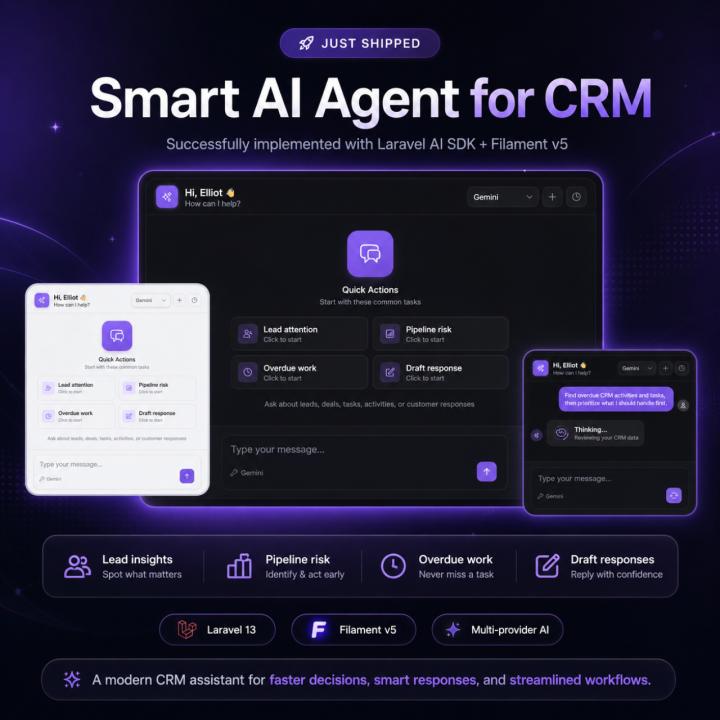
The CRM Smart AI Agent appears as a custom dashboard widget inside TenantSaaS.
Instead of opening a separate AI application, copying CRM data, and manually explaining the situation, users can ask questions directly from the dashboard.
The agent can help users understand their CRM activity, review important records, and prepare their next actions from one place.
Users can ask questions such as:
Which leads need my attention today?
Which deals are at risk?
What tasks are overdue?
Which activities should I prioritize?
What is the current pipeline value?
Which leads have not been contacted recently?
What should I focus on today?
Can you draft a follow-up response for this customer?
This creates a more practical AI experience because the assistant is connected to the CRM workflow instead of operating as a separate generic chatbot.
Quick Actions for Common CRM Work
The widget includes quick-action options for common CRM tasks.
Lead Attention
This action helps users identify leads that may need immediate follow-up.
The agent can review lead status, recent activity, assigned users, pipeline stages, and other available CRM information to highlight leads that may require attention.
Pipeline Risk
The pipeline-risk action helps users understand which deals may be slowing down or becoming less likely to close.
It can help surface:
Stale opportunities
Deals without recent activity
Deals stuck in one stage
Opportunities with overdue tasks
Deals approaching expected closing dates
Pipeline stages with unusual delays
This gives sales teams a clearer view of where they should focus.
Overdue Work
The overdue-work action reviews pending and overdue CRM tasks.
It can help users prioritize:
Follow-up calls
Meetings
Customer replies
Proposal reviews
Deal-related activities
Internal CRM tasks
Instead of manually checking several pages, users can receive a focused summary of the work that needs attention first.
Draft Response
The Smart Agent can also help prepare professional customer responses.
It can assist with drafting:
Lead follow-up messages
Proposal responses
Meeting confirmations
Sales emails
Deal updates
Customer check-ins
Next-step messages
The generated response remains a draft so the user can review and edit it before sending.
Multiple AI Providers
The CRM Smart AI Agent supports multiple AI providers already configured in TenantSaaS.
A compact provider selector is available in the top-right corner of the widget.
Users can choose the provider they want to use before sending a message.
This makes the agent flexible and allows TenantSaaS to work with different AI models without tying the CRM experience to a single provider.
The selected provider is handled securely on the server, and API credentials are never exposed in the browser.
Built With Laravel AI SDK
The Smart Agent is powered by the Laravel AI SDK.
This allows the CRM assistant to use structured AI agents, conversations, tools, provider selection, and controlled application actions through Laravel.
The agent does not receive unrestricted access to the application database.
Instead, it uses dedicated CRM tools to retrieve only the information required for a specific request.
Examples of CRM tools may include:
CRM dashboard summary
Lead search
Lead details
Pipeline overview
Overdue activity lookup
Upcoming activity lookup
Customer timeline
Stale lead analysis
Team workload analysis
This tool-based architecture makes the Smart Agent more reliable, secure, and relevant to real CRM operations.
Designed for Tenant-Safe CRM Access
TenantSaaS is a multi-tenant platform, so data isolation is one of the most important parts of the Smart Agent architecture.
The agent only works with data belonging to the currently active tenant.
It does not accept a tenant identifier from the AI prompt and cannot switch to another company’s CRM data.
Every CRM tool follows the active tenant context and the authenticated user’s permissions.
This means the agent respects access rules such as:
Which leads a user can view
Which deals a user can access
Whether a user can see team performance
Whether a user can assign leads
Whether a user can change pipeline stages
Whether a user can view customer communications
The Smart Agent is designed to assist users without bypassing the CRM’s existing authorization system.
Safe Actions With User Confirmation
The Smart Agent can suggest CRM actions, but it does not silently modify important business data.
For example, the agent may propose:
Creating a follow-up task
Scheduling an activity
Adding a note
Updating a lead stage
Assigning a lead
Preparing a customer reply
These actions are shown to the user as confirmation cards.
The user can review the proposed action and choose whether to confirm or reject it.
This approach keeps the user in control and prevents the AI from performing unintended changes.
The agent does not support destructive actions such as deleting CRM records.
It also does not automatically send customer emails.
Conversation-Based CRM Assistance
The Smart Agent supports ongoing conversations.
Users can ask an initial question and then continue with follow-up questions without repeating the full context.
For example:
Show me the overdue tasks.
The user can then ask:
Which one is the highest priority?
And later:
Prepare a follow-up action for that lead.
This conversational workflow makes it easier to explore CRM information and move from analysis to action.
Previous CRM conversations can also be stored and reopened, depending on the user’s permissions.
A Native Filament Experience
The widget is built as a custom Filament v5 dashboard widget.
It follows the same design system as the rest of TenantSaaS and supports:
Light mode
Dark mode
Mobile screens
Desktop dashboards
Responsive layouts
Filament theme colors
Livewire interactions
Loading states
Conversation history
Provider selection
The interface was designed to feel like a natural part of the CRM dashboard rather than an external embedded chatbot.
Real-Time CRM Decision Support
The purpose of the Smart Agent is not to replace CRM users.
Its purpose is to help them understand their data faster.
The agent can reduce the time required to review dashboards, inspect individual records, find overdue work, and prepare routine customer responses.
This can help teams make faster decisions by answering practical questions such as:
What should I focus on today?
Which deals are most important?
Which leads have gone cold?
What work is overdue?
Which customers need a response?
What is happening in the sales pipeline?
Where is revenue coming from?
Which opportunities are close to completion?
The result is a CRM experience that is more interactive, useful, and action-oriented.
Useful for Small and Growing Teams
Small businesses often have limited time to review every CRM record manually.
Growing teams may also struggle with larger pipelines, more customer interactions, and more follow-up activities.
The CRM Smart AI Agent helps both types of users by providing a quick overview of what matters most.
It can support:
Business owners
Sales teams
Account managers
Customer relationship teams
Project coordinators
Team managers
Administrative users
Each user only receives information allowed by their role and permissions.
Included With the TenantSaaS CRM Module
The CRM Smart AI Agent is part of the TenantSaaS CRM experience.
Businesses can use the CRM to manage:
Leads
Accounts
Contacts
Deals
Pipelines
Activities
Tasks
Reports
Lead sources
Tags
Custom fields
Customer follow-ups
The Smart Agent adds an intelligent layer on top of these features, helping users understand and act on their CRM data more efficiently.
The Future of CRM Inside TenantSaaS
The CRM Smart AI Agent is an important step toward making TenantSaaS a more intelligent business platform.
Future improvements may include deeper CRM insights, improved task recommendations, smarter summaries, additional automation proposals, and more advanced business analysis.
The focus will remain the same:
Keep the user in control
Protect tenant data
Respect permissions
Reduce repetitive work
Turn CRM information into useful actions
Start Using the CRM Smart AI Agent
The CRM Smart AI Agent is now available inside the TenantSaaS CRM dashboard.
Users can select an available AI provider, choose a quick action, or ask their own CRM-related question directly from the widget.
It provides a faster and more intelligent way to review leads, monitor pipelines, prioritize tasks, and prepare customer responses.
Work smarter, respond faster, and make better CRM decisions with TenantSaaS.
Visit tenantsaas.com to explore the CRM module and Smart AI Agent.