Keep the catalog organized
Store product details, pricing, images, SKUs, categories, stock levels, and active or featured states in one searchable catalog.
Product Management
Organize your product catalog, monitor stock, process tenant sales through Point of Sale, generate customer bills, and review product performance from one tenant-aware workspace.
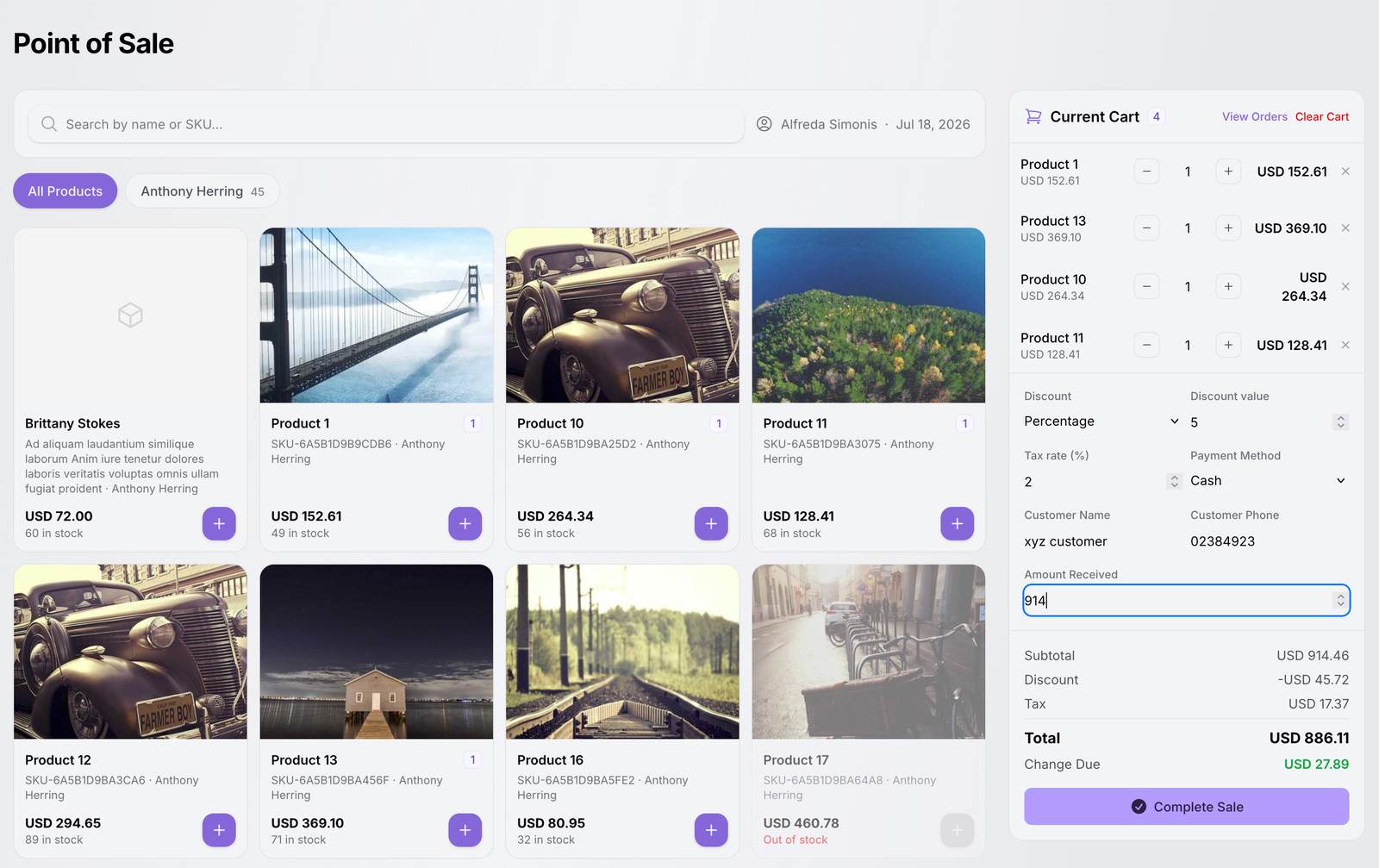
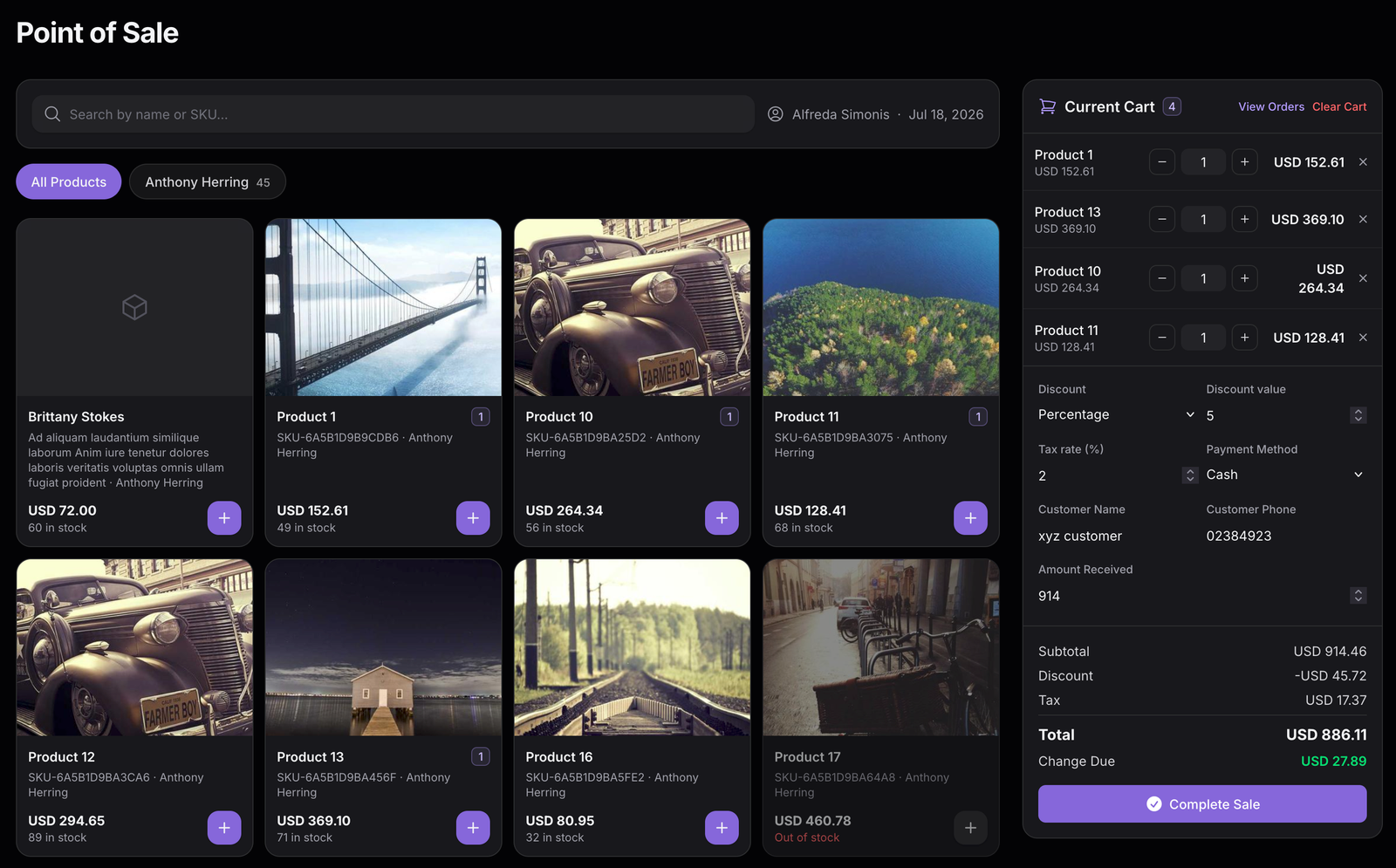
The authenticated tenant POS brings product search, cart lines, bill calculation, customer details, and payment recording together.
Product Management Overview
TenantSaaS Product Management connects structured product records with authenticated POS sales, order history, printable billing documents, and product analytics — while keeping the data inside the active workspace.
Store product details, pricing, images, SKUs, categories, stock levels, and active or featured states in one searchable catalog.
The POS shows sellable products and available quantities, then validates stock again when the sale is completed.
A sale becomes an order with item snapshots, totals, customer details, payment state, source, cashier, and a generated order number.
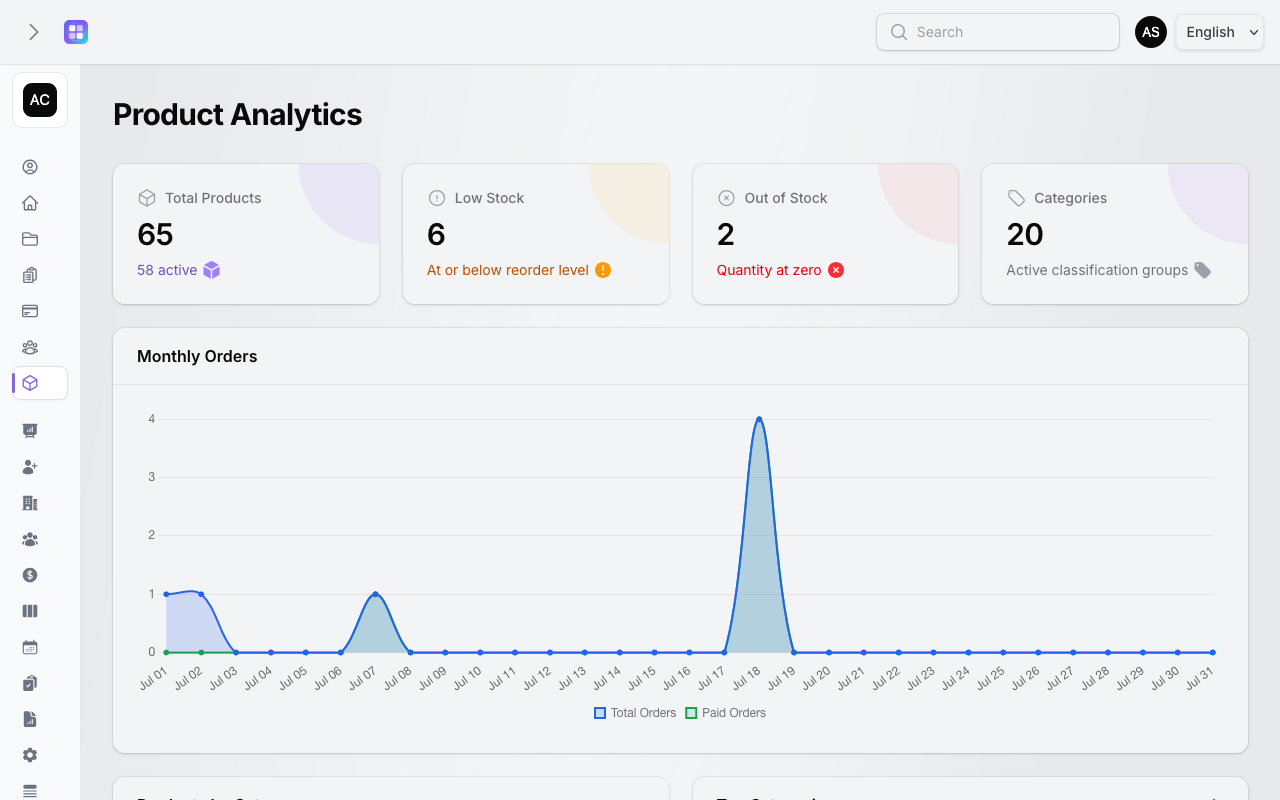
Product Analytics turns tenant records into daily order activity, stock alerts, category distribution, and paid-order revenue views.
Core Capabilities
Each capability below maps to an existing resource, tenant page, action, widget, model, or service in TenantSaaS.
Keep product records, prices, SKUs, images, descriptions, attributes, and availability together.
Classify products with active, ordered categories and optional parent categories for clearer browsing.
See current quantities, minimum stock levels, low-stock records, and out-of-stock products before a sale.
Use the authenticated tenant POS to find sellable products, build a cart, calculate the bill, and complete a sale.
Review POS, manual, and online order records with payment and fulfilment statuses in one tenant workspace.
Print a tenant receipt and download a generated invoice for paid orders where the authorized action is available.
Understand catalog size, stock risk, daily order activity, category contribution, and paid-order revenue.
Product and category creation checks the active tenant plan and surfaces the upgrade path when a limit is reached.
Product Catalog
The Products resource gives tenant teams a clear record for each product and the table tools to maintain it over time.
Products support a name, description, unique SKU, regular price, optional sale price and cost price, images, tags, variants, and custom attributes.
Active and featured flags, quantity, minimum stock level, and category columns make the catalog easier to operate.
The Products table supports search, sorting, category/active/featured filters, low-stock and out-of-stock filters, view, edit, duplicate, delete, and bulk actions.
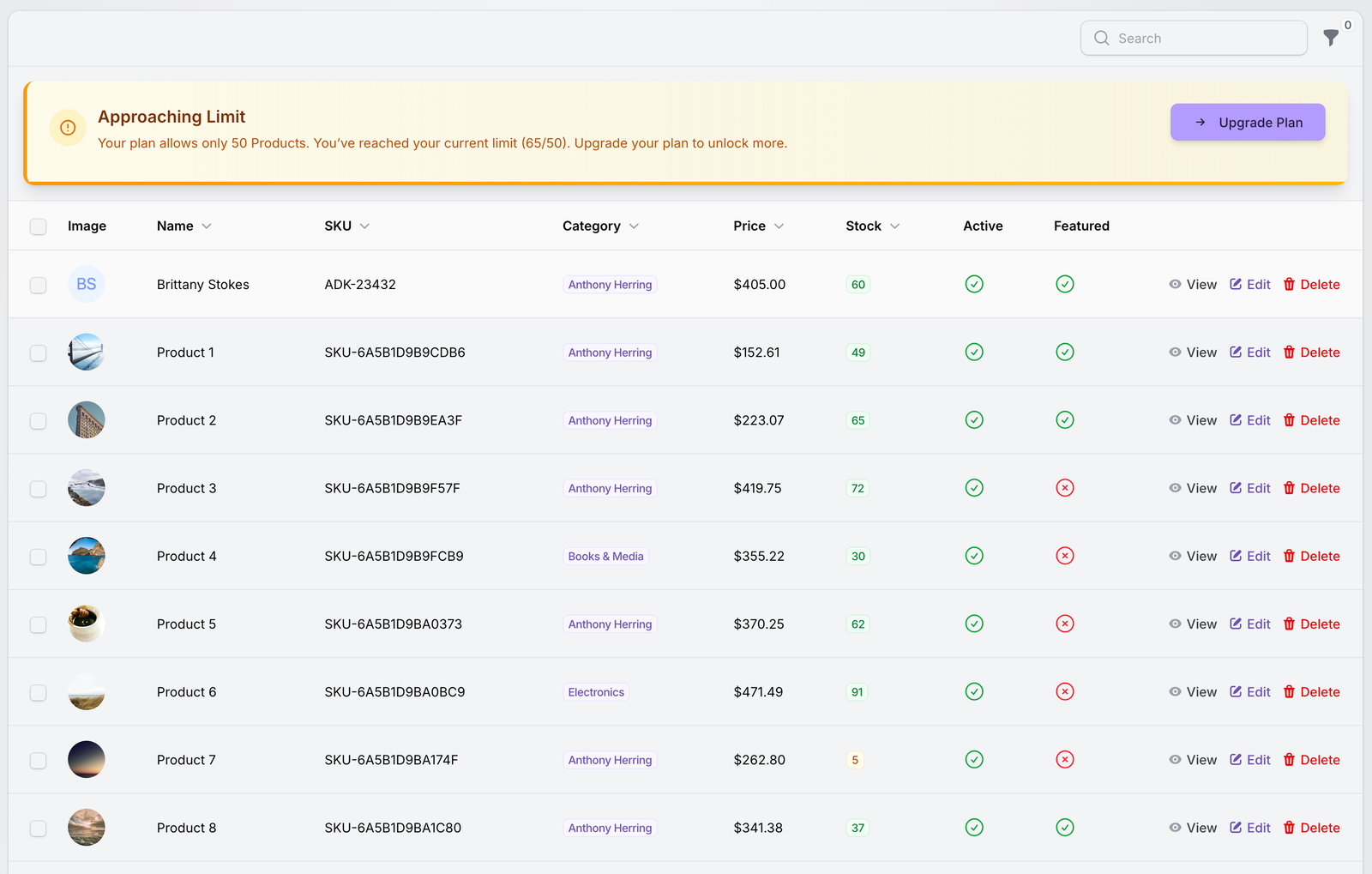
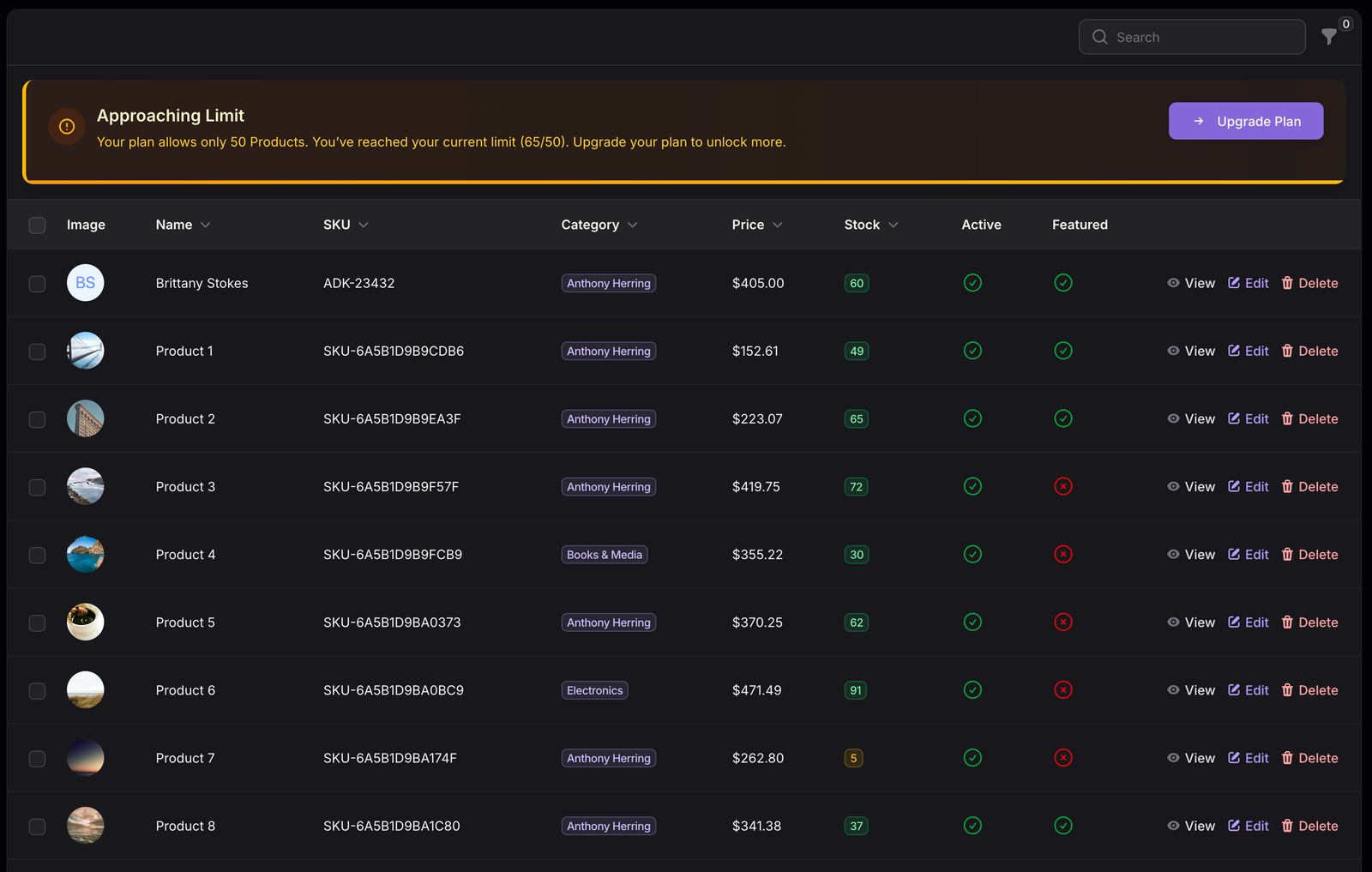
Product images, names, SKUs, categories, prices, stock, active state, featured state, and authorized record actions.
Categories
Categories belong to the active tenant and support names, slugs, descriptions, images, active state, sort order, product counts, and optional parent categories. Active ordered categories are available to POS browsing, while the Categories resource supports search, sorting, parent filters, and active filters.
Group products by the classifications your workspace uses.
Filter the Products table and narrow POS product browsing by active category.
Parent and child relationships are supported for category organization.
Product Analytics reports product distribution and paid-order category contribution.
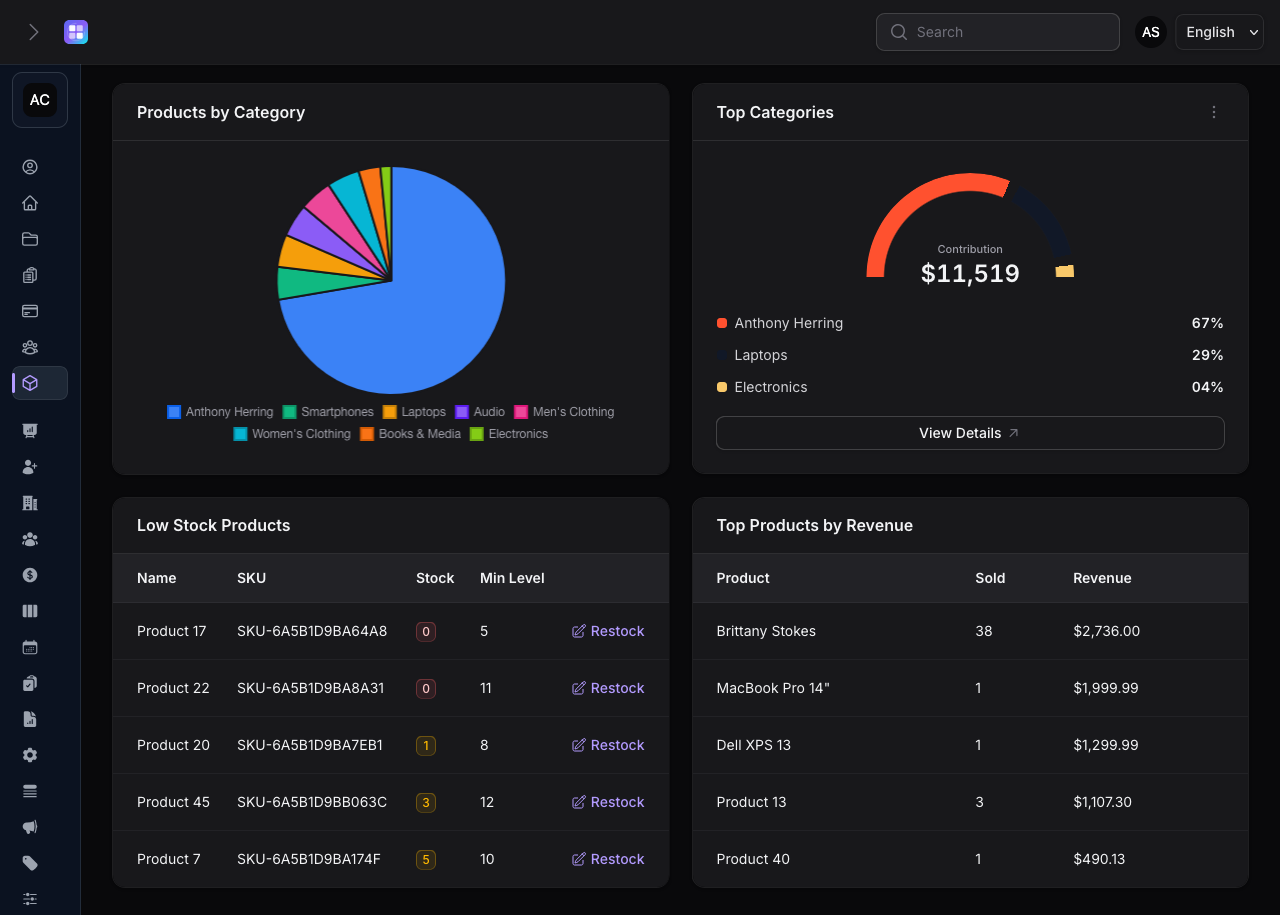
Low Stock Products shows the product name, SKU, current quantity, minimum level, and a Restock link to edit the product record.
Stock Visibility
Product Management provides stock visibility rather than an unimplemented warehouse system: quantities and minimum levels are visible where the team sells and reviews products.
A product is low stock when quantity is at or below its configured minimum level.
Quantity at zero or below is surfaced separately and cannot be added to the POS.
Cart changes check current quantity and the checkout action locks products during the server-side sale transaction.
The Restock action opens the product edit form so an authorized user can update its record.
Authenticated Point of Sale
The Point of Sale is an authenticated tenant tool. It is not a public storefront or a fake public checkout: authorized workspace users use it to search products, build a cart, calculate a bill, and complete a sale.
The real POS surface shows product search, category browsing, current cart lines, stock, discounts, tax, customer fields, payment method, amount received, change due, and Complete Sale.
Search by product name or SKU and filter by category.
Add lines, adjust quantities within stock, remove items, or clear the cart.
Use fixed or percentage discounts and enter a tax rate from 0 to 100.
Server-side validation creates the paid POS order and decrements stock transactionally.
POS Workflow
This sequence follows the actual PointOfSale page and CompletePosSaleAction, including the server-side checks performed before stock is changed.
Search by name or SKU, browse active categories, and see price and available quantity before adding a line.
Add products, increase or decrease quantities, remove lines, or clear the current cart.
Apply a fixed or percentage discount, calculate tax on the discounted subtotal, and show the final total.
Enter optional walk-in name and phone details, choose a POS payment method, and record cash received when needed.
The server validates stock and inputs inside a transaction, creates the POS order, marks it paid, and reduces stock.
After a completed sale, the authorized tenant user can open the printable receipt and revisit it from Orders.
Cart and Billing
The POS calculates line totals from the current product price, applies a fixed or percentage discount capped to the subtotal, calculates tax on the discounted subtotal, and shows subtotal, discount, tax, total, amount received, and change due. The checkout action validates the same boundaries server-side.
Walk-In Sales
A POS sale can be completed for a walk-in customer without requiring a full customer account. Customer name and phone are optional; when no name is supplied, the order uses Walk-in Customer. If details are supplied, they are stored with the order billing details for clearer receipts and order records.
POS payment methods
Cash, Card, and Bank Transfer are accepted by the POS. Other payment methods may exist for online or manually recorded orders; selecting a method in an order does not by itself mean a payment gateway was charged.
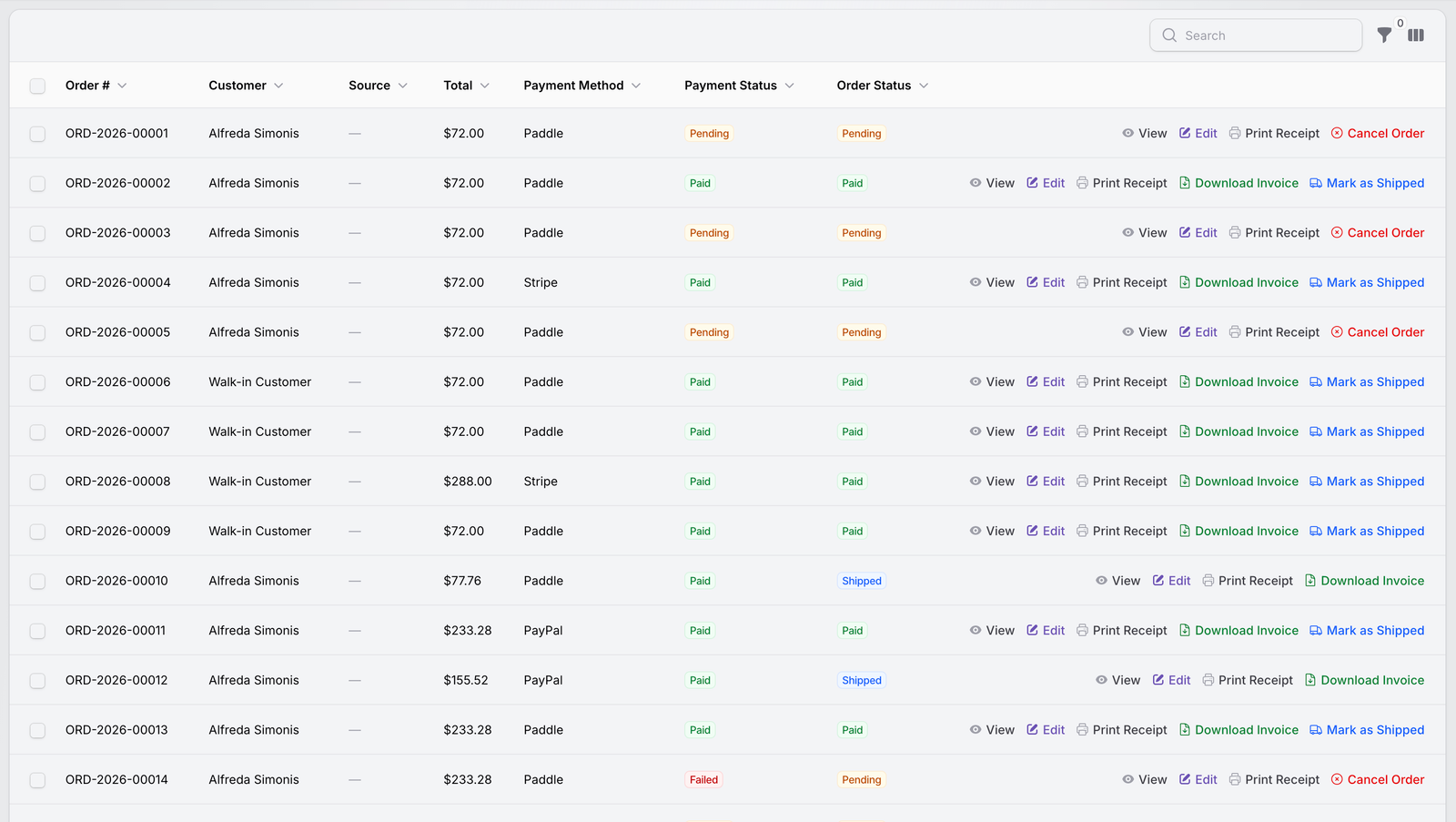
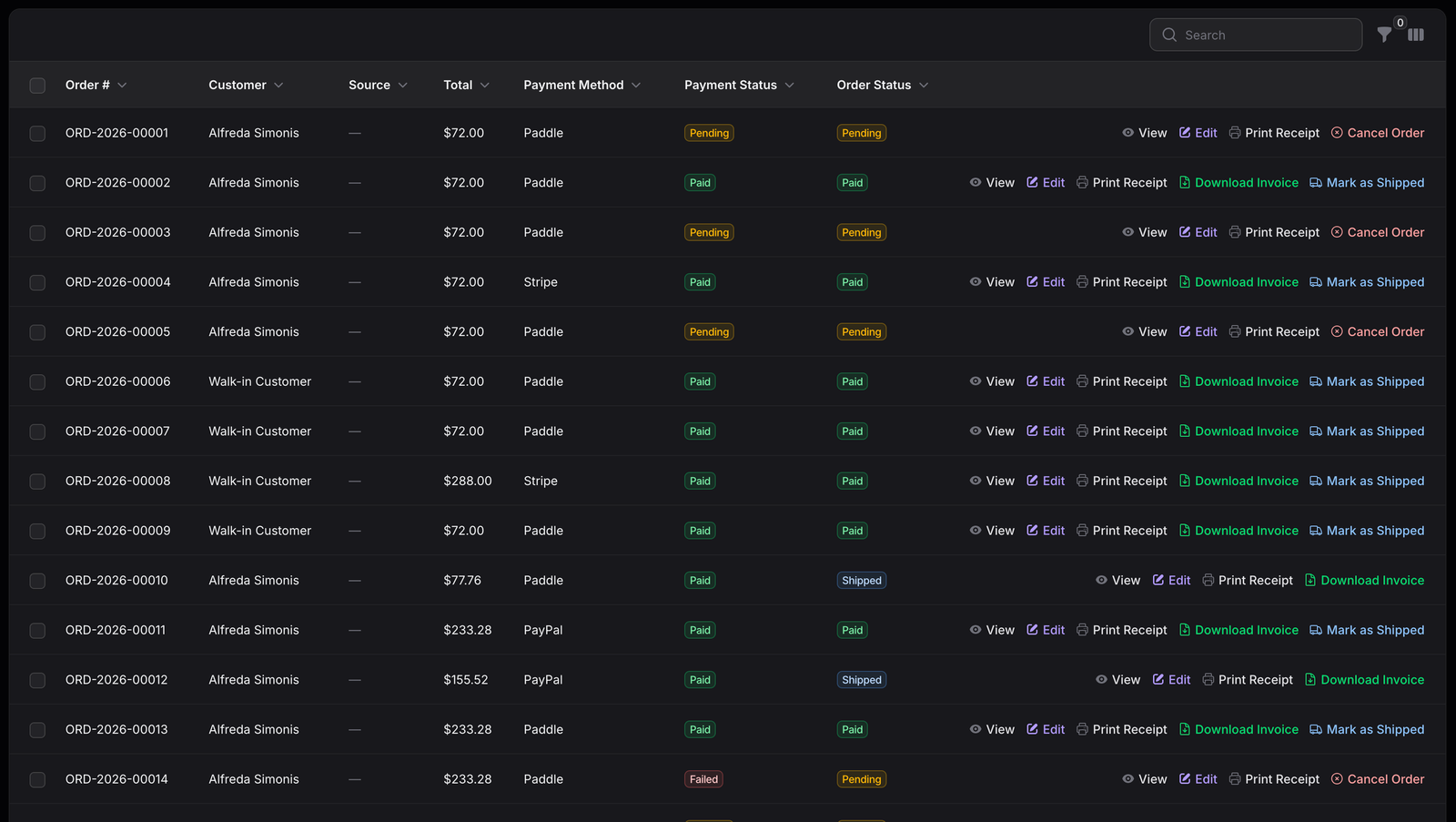
Order numbers, customers, source, totals, payment methods, payment statuses, order statuses, and conditional actions remain visible in the tenant workspace.
Order Management
Orders bring POS, manual, and online records into a consistent tenant table without hiding the source or payment state.
Pending, Paid, Failed, and Refunded distinguish the payment state recorded for an order.
Pending, Paid, Shipped, and Cancelled show the order workflow. Paid orders can be marked shipped when the transition is valid.
Orders can be identified as POS, Manual, or Online, so teams can distinguish how a record entered the workspace.
Receipts and Invoices
The audited implementation provides a printable receipt view and a PDF invoice generator for authorized tenant users.
Open the receipt after a POS sale or use Print Receipt from the Orders table. The route checks tenant membership and order-view permission.
Paid orders expose Download Invoice to authorized users. The invoice service renders an A4 PDF from the order, items, tenant, customer, totals, and payment details.
Order items store product name, price, quantity, totals, and a product snapshot so historical line details remain available even if the product record changes.
Product Analytics
Product Analytics is made from the real tenant widgets: catalog statistics, current-month daily order data, category distribution, paid-order category revenue, low-stock products, and top products by revenue.
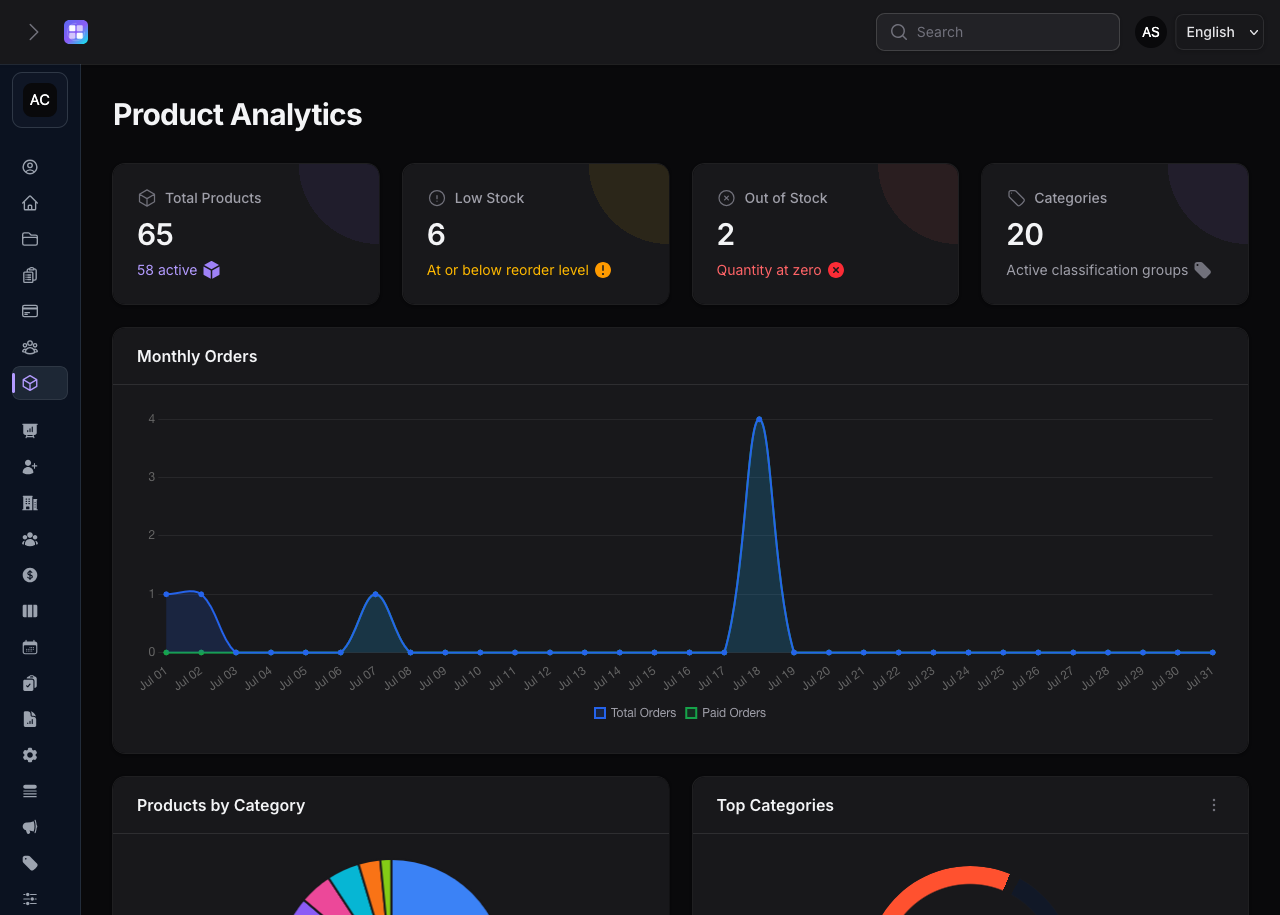
Product totals, active products, low-stock products, out-of-stock products, categories, and date-wise monthly orders.
Product Analytics reports total products, active products, low-stock products, out-of-stock products, and categories.
The current month chart creates one daily bucket for every date and compares total orders with paid orders.
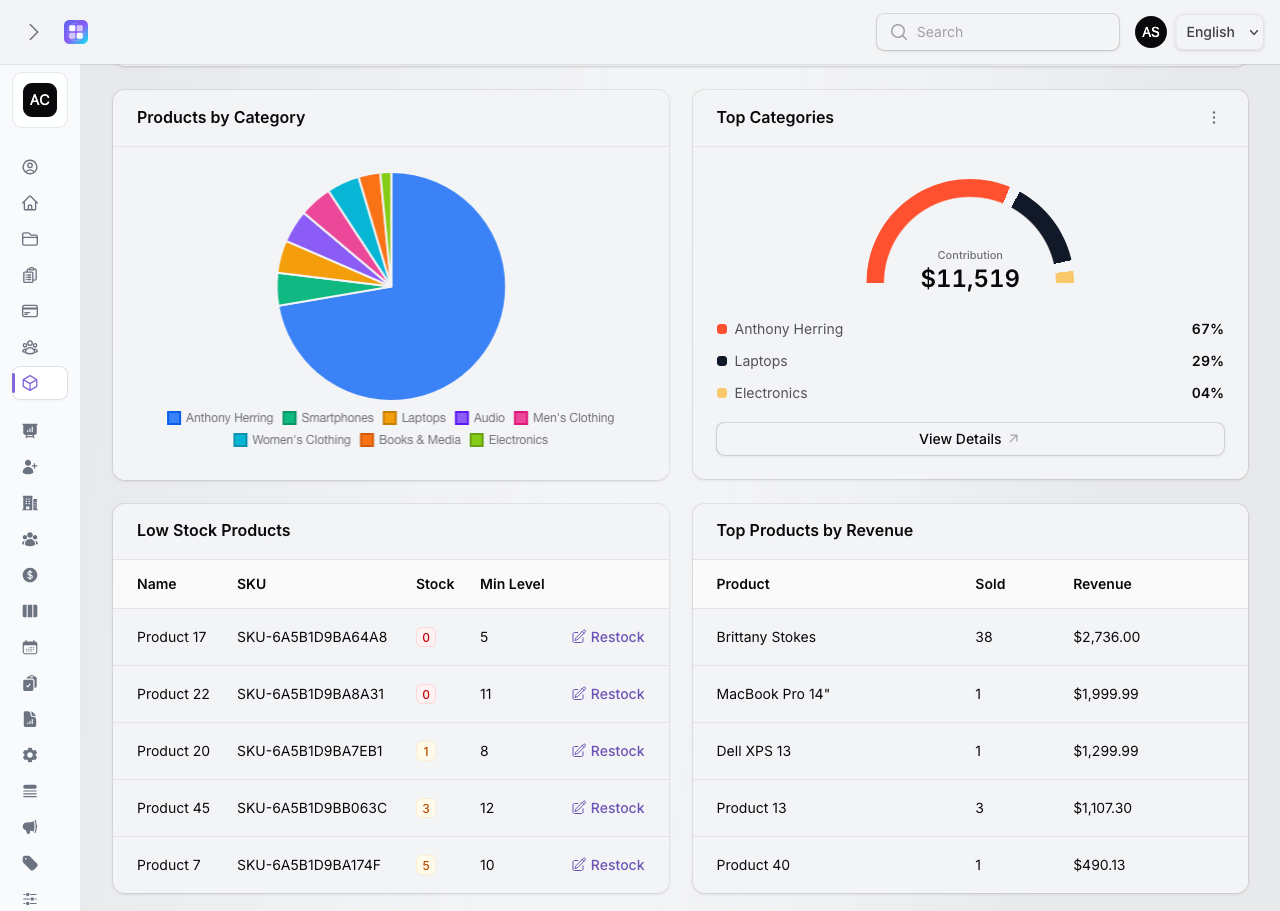
Products by Category shows catalog distribution, while Top Categories ranks the top three categories by paid order-item revenue.
Low Stock Products lists name, SKU, quantity, and minimum level, with Restock opening the product edit record.
Top Products by Revenue groups paid order items by product name and shows units sold and revenue.
Category and Revenue Detail
The supporting analytics widgets use paid order items: category contribution is grouped by category, and top products are ranked by units sold and revenue. These are revenue views, not profit forecasts.
A useful boundary
The implementation reports historical paid-order activity and product/category contribution. It does not calculate profit, forecast demand, or provide AI sales predictions.
Products by Category, Top Categories, Low Stock Products, and Top Products by Revenue.
Plan-Aware Usage
Product and category creation and duplication use the tenant's configured plan limits. The resource tables can show a reached-limit alert with current usage and an Upgrade Plan link to the tenant plans page. This page intentionally does not publish a screenshot-specific limit because plan values are data, not fixed product promises.
Review public plansTeam Access and Tenant Scope
Products, categories, orders, and POS queries are associated with a team. Owners and users with the relevant permissions can access the module; product, category, order, POS, receipt, invoice, shipping, and cancellation actions are checked through the existing authorization model. The POS and analytics use the active tenant's records.
Product Preview
The public page uses the real paired screenshots so light and dark themes show the corresponding interface without loading authenticated POS scripts or creating public interactions.
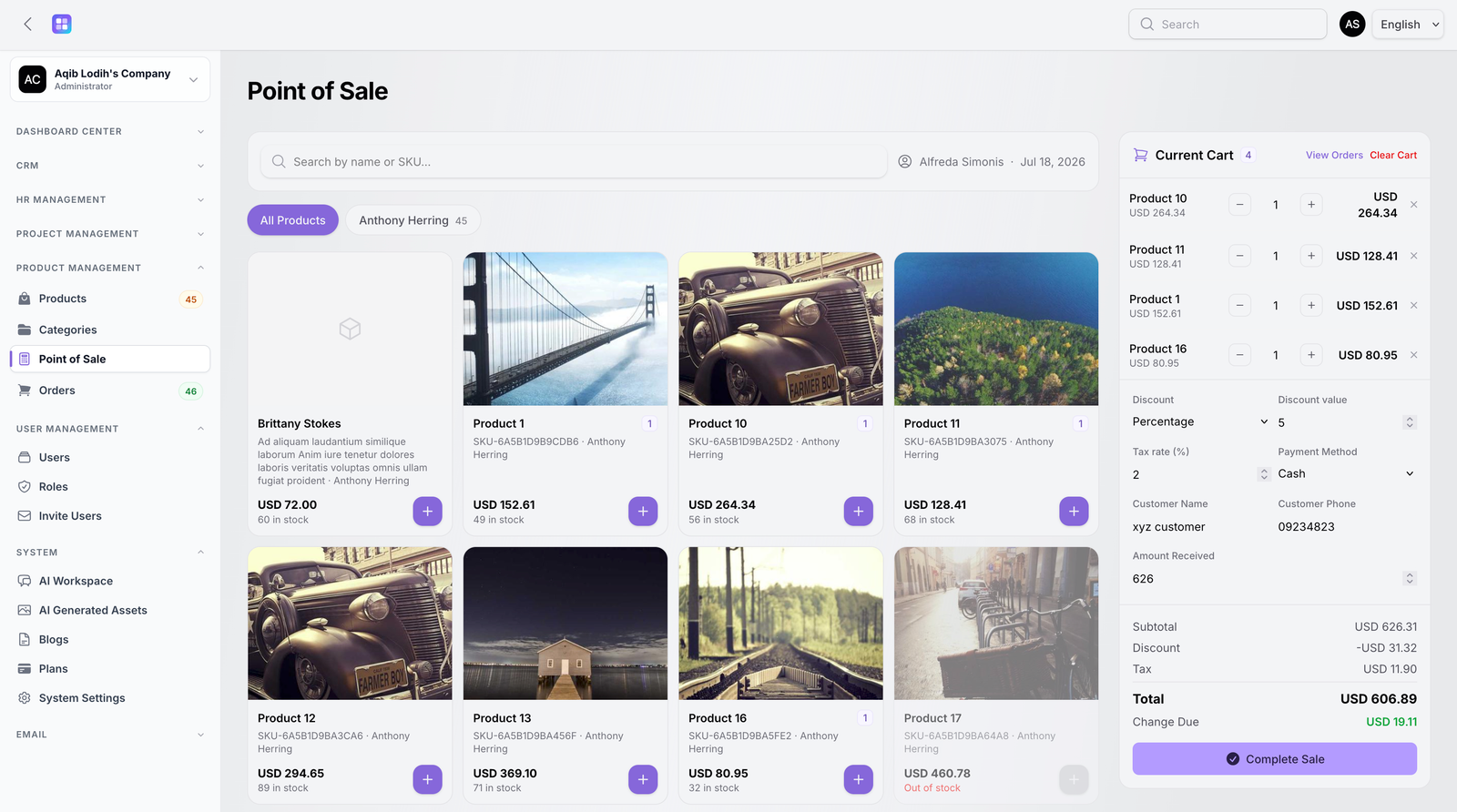
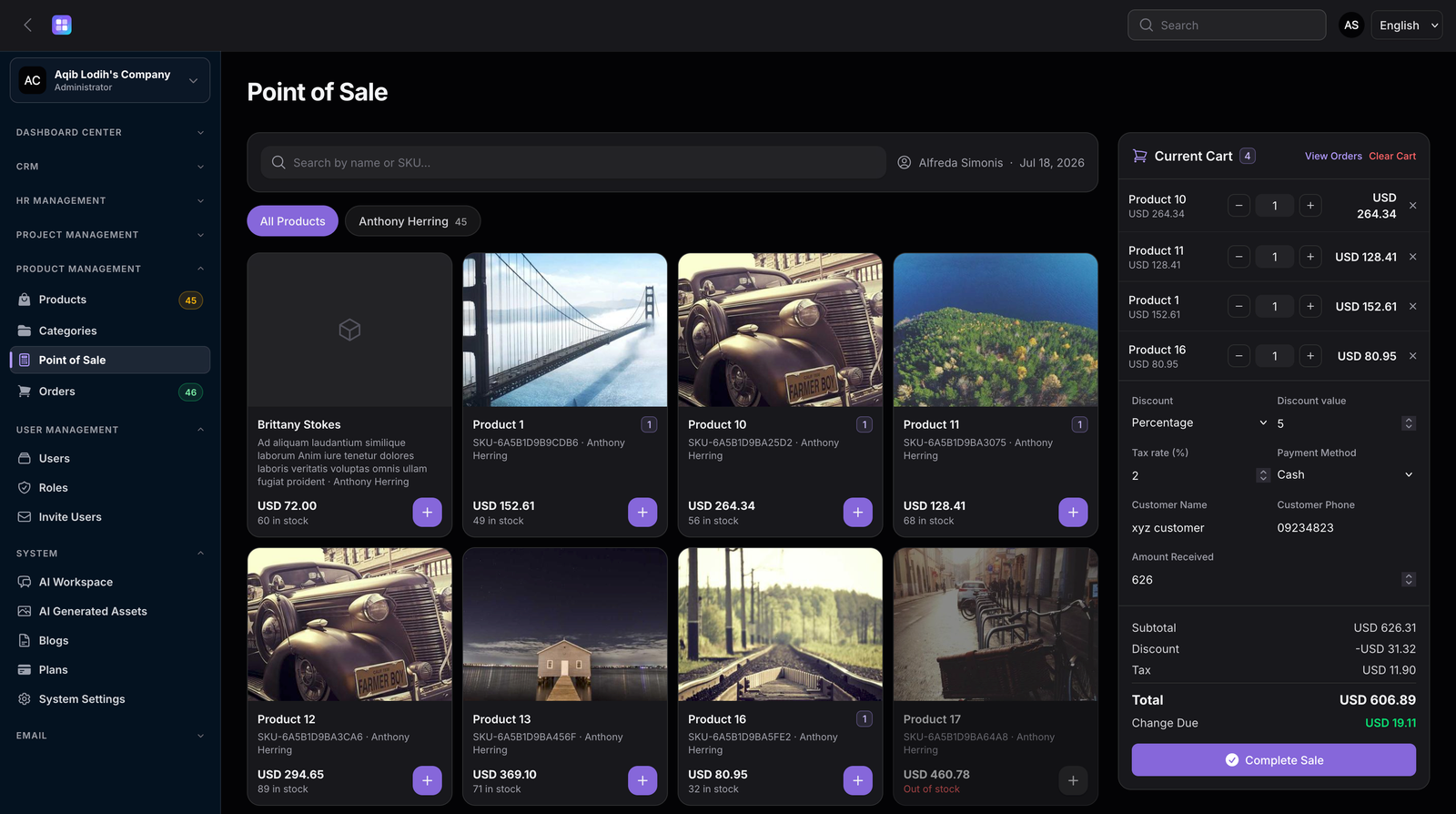
The sidebar variant shows where the POS sits within the Product Management navigation.
Review the order created by a POS sale and its available documents and status actions.
View order details →Practical Use Cases
Use Product Management for the workflows that are implemented today, without turning it into an unsupported ERP or marketplace promise.
Maintain product images, descriptions, prices, SKUs, categories, active states, and stock quantities.
Search products, build a cart, apply discount and tax, capture optional walk-in details, and complete a POS sale.
Identify low-stock and out-of-stock products before they become a surprise at the point of sale.
Review payment and order statuses and mark eligible paid orders as shipped.
Print receipts and download generated invoices where the authorized order action is available.
Use category distribution, paid-order category revenue, low-stock tables, and top-product revenue views.
Connected Workflow
TenantSaaS Product Management does not replace every accounting or warehouse system. It does give the audited catalog, POS, order, billing, and analytics steps one workspace.
Documentation and Next Steps
There is no dedicated public Product Management documentation route in the current application, so these links point only to existing public pages.
FAQ
Every answer below is based on the audited Product Management implementation and matches the FAQ structured data.
It is an authenticated tenant workspace for maintaining product and category records, seeing stock, processing sales through Point of Sale, managing orders, producing billing documents, and reviewing product analytics.
Product records include a name, description, unique SKU, price, optional sale and cost prices, quantity, minimum and optional maximum stock levels, category, active and featured states, images, tags, variants, dimensions, weight, and custom attributes.
Yes. Categories support names, slugs, descriptions, images, active state, sort order, tenant ownership, and optional parent categories. Products can be filtered by category and POS browsing uses active ordered categories.
Yes. The workspace stores product quantity and minimum stock level, identifies low-stock and out-of-stock products, shows stock in the Products table and POS, validates available quantity, and decrements stock after a completed POS sale.
Yes. The authenticated Point of Sale searches sellable products by name or SKU and can also filter the product list by category.
Yes. The POS supports no discount, a fixed discount, or a percentage discount, plus a tax rate from 0 to 100. Tax is calculated on the subtotal after the discount, and the server validates the same inputs when the sale is completed.
Yes. Customer name and phone are optional POS fields. When no name is supplied, the order records Walk-in Customer; a supplied name and phone are kept in the order billing details.
POS sales accept Cash, Card, and Bank Transfer. The broader Orders resource can also represent Paddle, Stripe, JazzCash, and PayPal for other order workflows. Recording a method in an order is not by itself a claim that a gateway was charged.
Yes. A completed POS sale creates an order with a generated order number, POS source, order items with product snapshots, totals, payment details, customer details, and cashier information, then marks the order paid.
Authorized tenant users can print a receipt after a POS sale or from Orders. Paid orders also expose the authorized Download Invoice action, which generates a PDF invoice containing the order and tenant details.
Order statuses are Pending, Paid, Shipped, and Cancelled. Payment statuses are Pending, Paid, Failed, and Refunded. Visibility of actions depends on the valid transition and the user permission.
Product Analytics shows catalog and stock metrics, current-month daily order activity, product distribution by category, top categories by paid-order revenue, low-stock products, and top products by paid-order revenue.
Yes. Product and category creation and duplication check the active tenant plan. The Products and Categories resources can display a usage warning with a link to the tenant plan page when the configured limit is reached.
No. The Point of Sale described here is an authenticated tenant tool for creating sales and bills. This public page is a product preview and does not create public carts, charges, or orders.
No such supplier, warehouse, purchase-order, stock-transfer, or inventory-valuation workflow was included in the audited Product Management implementation, so those capabilities are not advertised here.
Organize your catalog, monitor stock, process authenticated POS sales, and maintain tenant-specific order records with TenantSaaS Product Management.