A New Way to Work Inside TenantSaaS
Running a business means constantly switching between screens — creating a project here, adding an employee there, updating a product listing somewhere else. It adds up fast, and most of it is just repetitive clicking.
That's exactly what we set out to fix with the new AI Workspace in TenantSaaS. Instead of navigating through menus for every task, you can now just type what you need — in plain language — and let the AI Assistant handle it.
Meet Your AI Assistant
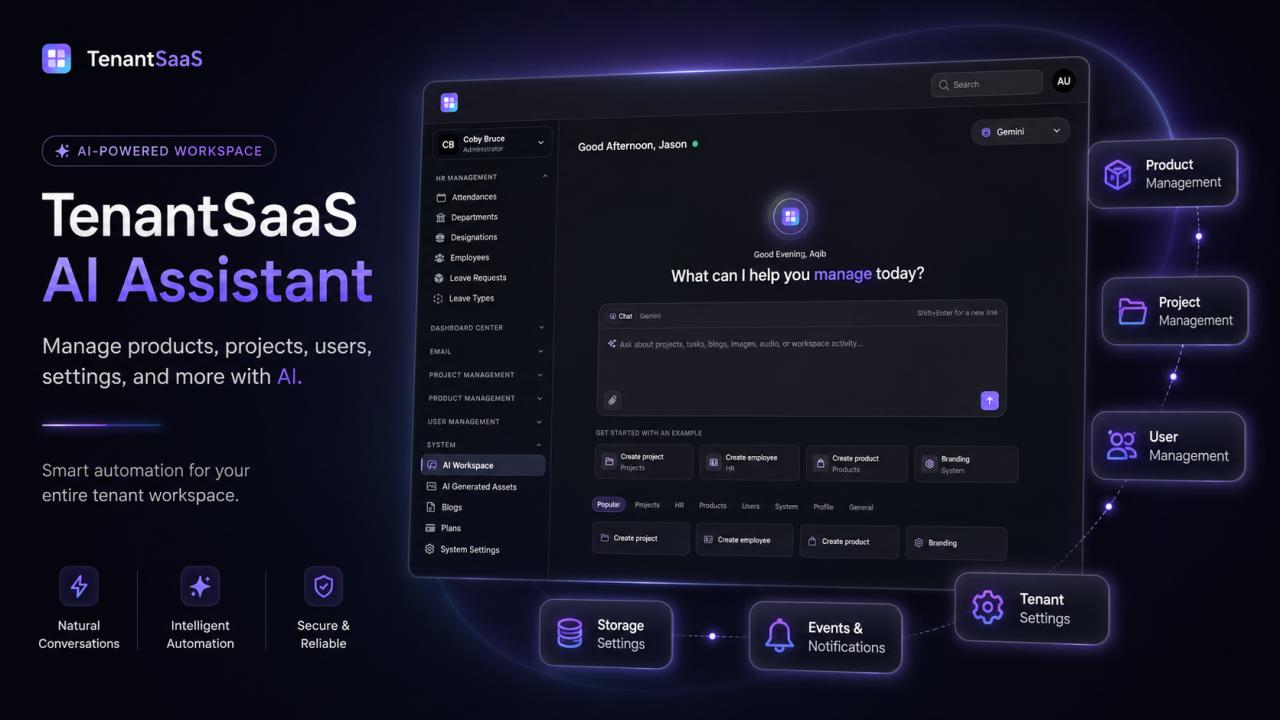
The moment you open AI Workspace, you're greeted with a simple prompt: "What can I help you manage today?" From there, it works like a conversation. Ask it to create a project, add a new employee, generate a product, or update your branding — and it takes care of the rest, directly inside your TenantSaaS account.
No new tool to learn. No separate login. It's built right into the panel you already use every day, accessible anytime from the AI Workspace tab in your sidebar.
What the AI Assistant Can Do
The AI Assistant currently supports a wide range of actions across the platform, including:
Project Management
Create and manage projects, assign tasks, and keep everything organized — just by describing what you need.
Product Management
Add new products, update details, and manage your catalog without digging through forms.
HR & Employee Management
Create employee records, manage HR details, and keep your team information up to date.
User Management
Add, update, or organize users and their access across your organization.
System & Branding
Adjust system settings and branding — colors, profile details, and other configuration — through a quick conversational request instead of hunting through settings pages.
To make getting started even easier, the AI Workspace includes ready-made examples like "Create project," "Create employee," "Create product," and "Branding" — so you can see exactly what's possible with a single click, organized into categories like Popular, Projects, HR, Products, Users, System, Profile, and General.
Beyond Chat: A Full AI-Powered Section
The AI Assistant is just one part of a broader AI Workspace built into TenantSaaS. Alongside the chat interface, you'll also find:
AI Generated Assets — a dedicated space for visual and media content generated by the assistant
Blogs — AI-assisted content creation tools
Plans — manage your subscription and usage
System Settings — fine-tune how the AI Assistant and your workspace behave
Together, these turn AI Workspace into a genuine command center for the operational side of your business — not just a chatbot bolted onto the side of your dashboard.
Why This Matters
Most business software asks you to adapt to its structure — learn the menus, remember where things live, click through several screens to complete a simple task. The AI Assistant flips that around: you describe what you want, and TenantSaaS handles the navigation for you.
For growing teams especially, this means less time spent on routine admin and more time spent on the work that actually moves the business forward.
Try It Today
The AI Assistant is available now inside your TenantSaaS panel under System > AI Workspace. Start with one of the quick-start examples, or simply type what you need — creating a project, adding a team member, or generating a product — and see how much time it saves.
It's not just a new feature. It's a new way of getting things done in TenantSaaS.